

Technical SEO for ecommerce involves optimizing website structure and performance to improve search engine rankings and user experience. In the competitive ecommerce landscape, technical SEO plays a crucial role in driving organic traffic and boosting sales.
Effective technical SEO ensures that search engines can easily crawl and index your site. This includes optimizing page speed, mobile friendliness, and secure connections. Proper use of structured data can enhance search visibility with rich snippets. A well-organized site architecture aids in both user navigation and search engine indexing.
Regular audits can identify and fix technical issues before they impact rankings. Implementing these strategies can significantly enhance your ecommerce site’s performance and visibility in search engine results.
Introduction To Technical Seo
Technical SEO is the backbone of any successful eCommerce site. It helps search engines crawl and index your website. This leads to better visibility and higher rankings. Without good technical SEO, your products may never reach your target audience.
Importance For Ecommerce
Technical SEO is crucial for eCommerce websites. It ensures your site runs smoothly and efficiently. A well-optimized site improves user experience and increases sales. Customers are more likely to buy from a fast, secure, and easy-to-navigate website. Search engines prefer well-structured sites and rank them higher.
Here are some reasons why technical SEO is important:
- Improves website speed: Faster sites rank higher and reduce bounce rates.
- Ensures mobile-friendliness: A responsive design attracts more mobile users.
- Boosts security: HTTPS protocols build trust and protect data.
- Enhances crawlability: Search engines can index your pages easily.
Key Concepts
Understanding the key concepts of technical SEO can greatly benefit your eCommerce site. Below is a table summarizing some important aspects:
| Concept | Description |
|---|---|
| Website Speed | Faster loading times improve user experience and search rankings. |
| Mobile Optimization | Ensures your site is accessible and functional on mobile devices. |
| Secure Protocols | Implement HTTPS to secure data and build trust. |
| XML Sitemaps | Helps search engines understand the structure of your site. |
| Robots.txt | Guides search engines on which pages to crawl and index. |
Here are some key actions to take:
- Create an XML sitemap and submit it to search engines.
- Optimize images to reduce load times.
- Use HTTPS for a secure browsing experience.
- Ensure your site is mobile-friendly and responsive.
- Regularly check and update your robots.txt file.
Implementing these practices can help your eCommerce site perform better. This leads to more traffic and higher sales.

Site Speed Optimization
Site speed optimization is crucial for eCommerce success. Fast-loading sites enhance user experience. They also improve search engine rankings. Customers expect quick access to products. Slow sites can result in lost sales.
Improving Load Times
Improving load times involves various strategies. Optimize images for faster loading. Use compressed formats like JPEG and PNG. Implement lazy loading for images. This loads images only when needed.
Minify CSS, JavaScript, and HTML files. This reduces file sizes and speeds up your site. Use a Content Delivery Network (CDN). CDNs distribute content across multiple servers. This ensures faster access for users worldwide.
Enable browser caching to store resources locally. This reduces the load on your server. Reduce server response time by optimizing your database. Use caching plugins to improve performance.
Tools For Speed Testing
Various tools can help test your site speed. Google PageSpeed Insights is a popular choice. It provides detailed reports on your site’s performance. It also offers suggestions for improvement.
GTmetrix is another valuable tool. It analyzes your site’s speed and gives actionable tips. Pingdom is great for real-time speed monitoring. It also offers historical performance data.
Use WebPageTest for in-depth analysis. It allows you to test from multiple locations. This helps identify regional speed issues. Lighthouse is another excellent tool. It offers comprehensive audits and performance scores.
| Tool | Features |
|---|---|
| Google PageSpeed Insights | Performance reports, improvement suggestions |
| GTmetrix | Speed analysis, actionable tips |
| Pingdom | Real-time monitoring, historical data |
| WebPageTest | In-depth analysis, multiple locations |
| Lighthouse | Comprehensive audits, performance scores |
Incorporate these tools to monitor and improve your eCommerce site’s speed. Faster sites lead to better user experiences and higher sales.
Mobile-friendly Design
In today’s digital age, having a mobile-friendly design is essential for ecommerce success. More users now browse and shop using their smartphones. Ensuring your site is mobile-friendly boosts user experience and search rankings. Let’s dive into the key aspects of mobile-friendly design.
Responsive Design Tips
Responsive design ensures your website looks great on all devices. Here are some tips to make your ecommerce site responsive:
- Use fluid grids: Design your layout using percentages, not fixed widths.
- Flexible images: Ensure images resize within the bounds of their containers.
- Media queries: Apply CSS rules based on device characteristics like width.
- Test on multiple devices: Check your design on different screen sizes.
| Screen Size | Design Considerations |
|---|---|
| Small (320px – 480px) | Single column layout, large touch targets |
| Medium (481px – 768px) | Two-column layout, adjustable images |
| Large (769px – 1200px) | Multi-column layout, detailed navigation |
Mobile Usability
Mobile usability focuses on how easily users can navigate your site on mobile. Here are some crucial points:
- Fast loading times: Mobile users expect quick access. Optimize images and code.
- Easy navigation: Use clear menus and buttons. Avoid overcrowded layouts.
- Readable text: Ensure text is large enough to read without zooming.
- Touch-friendly elements: Buttons and links should be easy to tap.
- Accessible forms: Simplify forms for mobile users. Reduce the number of fields.
Implementing these tips will enhance the mobile experience. It will also improve your search engine rankings.
Url Structure
URL structure plays a critical role in Technical SEO for Ecommerce. A well-structured URL improves site navigation and enhances user experience. It also helps search engines understand your website’s content better.
Seo-friendly Urls
An SEO-friendly URL is short, descriptive, and easy to read. Users and search engines prefer clear and concise URLs. They should include relevant keywords. Avoid using unnecessary words or complex strings.
- Use hyphens to separate words.
- Avoid special characters.
- Keep the URL as short as possible.
- Include primary keywords.
| Good Example | Bad Example |
|---|---|
| www.example.com/blue-widgets | www.example.com/index.php?id=123&category=blue |
Canonical Tags
Canonical tags help prevent duplicate content issues. They tell search engines which version of a URL to index. This is crucial for ecommerce sites with similar products and variations.
- Add a canonical tag to your HTML head section.
- Ensure each page has a unique canonical URL.
- Use absolute paths in canonical tags.
Example of a canonical tag:
By maintaining a clean and consistent URL structure, you enhance both user experience and search engine rankings.
Xml Sitemaps
XML Sitemaps are crucial for eCommerce websites. They help search engines understand your site structure. A well-organized XML sitemap ensures all your pages get indexed.
Creating Sitemaps
Creating an XML sitemap is simple. You can use various tools. Some popular options include:
- Google XML Sitemaps Plugin
- Yoast SEO Plugin
- Screaming Frog SEO Spider
These tools generate a sitemap automatically. They ensure all new content gets included. This is essential for large eCommerce sites.
Submitting To Search Engines
After creating your sitemap, you need to submit it. This tells search engines about your site. Here’s how you do it:
- Go to Google Search Console.
- Navigate to “Sitemaps” under “Index”.
- Enter your sitemap URL and click “Submit”.
Submitting to other search engines is similar. For Bing, use Bing Webmaster Tools. Always ensure your sitemap is updated regularly. This helps search engines find new pages.
An effective XML sitemap boosts your eCommerce site’s visibility. It ensures all your product pages are indexed. This drives more traffic to your site.
Robots.txt File
In the world of ecommerce, Technical SEO plays a crucial role. One of the most important aspects is the robots.txt file. This file guides search engine bots on which pages to crawl or avoid. Understanding and optimizing your robots.txt file can significantly impact your site’s visibility.
Blocking Unwanted Pages
Not all pages on your ecommerce site need to be indexed. Blocking unwanted pages helps search engines focus on important content. For instance, you might block cart, checkout, or admin pages.
- Cart pages: These pages are dynamic and don’t need indexing.
- Checkout pages: Prevent indexing to secure customer data.
- Admin pages: Keep backend pages hidden from search engines.
Here’s an example of how to block these pages in your robots.txt file:
User-agent:
Disallow: /cart/
Disallow: /checkout/
Disallow: /admin/
Best Practices
Following best practices ensures your robots.txt file is effective.
- Keep it simple: Avoid complex rules that can confuse bots.
- Use absolute URLs: Ensure paths are correctly defined.
- Test your file: Use tools to check for errors in your robots.txt file.
Here’s a sample robots.txt file for an ecommerce site:
User-agent:
Disallow: /cart/
Disallow: /checkout/
Disallow: /admin/
Disallow: /search/
Allow: /products/
Sitemap: https://www.example.com/sitemap.xml
In this example, we block pages that don’t need indexing. We allow bots to access product pages and provide a link to the sitemap.
Always remember, a well-optimized robots.txt file can improve your site’s SEO. It helps search engines focus on the most valuable content.
Structured Data
Structured Data plays a crucial role in Technical SEO for Ecommerce. It helps search engines understand your content better. This leads to improved visibility and higher search rankings. Structured data can also enhance your product listings, making them more attractive to potential buyers.
Rich Snippets
Rich Snippets provide additional information about your products directly in search results. They can include prices, ratings, and availability. This extra information can make your listings stand out and attract more clicks.
- Prices: Show the cost of your products.
- Ratings: Display customer reviews and ratings.
- Availability: Indicate if a product is in stock.
Implementing rich snippets requires adding specific structured data to your product pages. This can be done using JSON-LD, Microdata, or RDFa formats. JSON-LD is the recommended format by Google.
Schema Markup
Schema Markup is a form of structured data used to enhance your website’s HTML. It provides context to search engines about your content. For ecommerce sites, schema markup can describe products, services, and business details.
Here are some common types of schema markup for ecommerce:
- Product Schema: Includes information like name, price, and availability.
- Review Schema: Displays customer ratings and reviews.
- Breadcrumb Schema: Shows the navigation path for users.
Using schema markup, you can make your ecommerce site more visible and user-friendly. This can lead to higher click-through rates and better SEO performance.
| Schema Type | Purpose |
|---|---|
| Product Schema | Details about products. |
| Review Schema | Customer ratings and reviews. |
| Breadcrumb Schema | Navigation path for users. |
To implement schema markup, you can use Google’s Structured Data Markup Helper. This tool helps you generate the required code. Simply choose the schema type, highlight the relevant elements, and copy the generated HTML code to your site.
Adding structured data to your ecommerce site is essential. It improves your search engine visibility and user experience. Start implementing it today to see the benefits.
Https Security
HTTPS security is crucial for any ecommerce website. It ensures that data between your site and users is encrypted. This protects sensitive information such as credit card details and personal data. HTTPS also builds trust with your customers, leading to higher conversion rates.
Ssl Certificates
An SSL Certificate is essential for enabling HTTPS on your ecommerce site. It stands for Secure Sockets Layer and encrypts data sent between the server and the client. Without SSL, your site is vulnerable to cyber-attacks.
SSL Certificates come in various types:
- Domain Validated (DV): Basic encryption and quick issuance.
- Organization Validated (OV): Validates the organization’s identity.
- Extended Validation (EV): Provides the highest level of validation and trust.
Installing an SSL Certificate is straightforward. Most hosting providers offer easy installation options. After installation, your site will display a padlock icon in the browser. This visual cue reassures users that their data is safe.
Impact On Seo
HTTPS security has a significant impact on SEO. Google considers HTTPS as a ranking signal. Sites with HTTPS are likely to rank higher in search results. This means more traffic and potential customers for your ecommerce site.
Here are some key SEO benefits of HTTPS:
- Improved search rankings.
- Increased user trust and higher conversion rates.
- Better referral data from Google Analytics.
- Protection against data breaches and cyber-attacks.
To fully benefit from HTTPS, ensure all pages on your site are secure. Use 301 redirects to move HTTP pages to HTTPS. Update all internal links to their HTTPS versions. This ensures a seamless user experience and maintains your SEO rankings.
Internal Linking
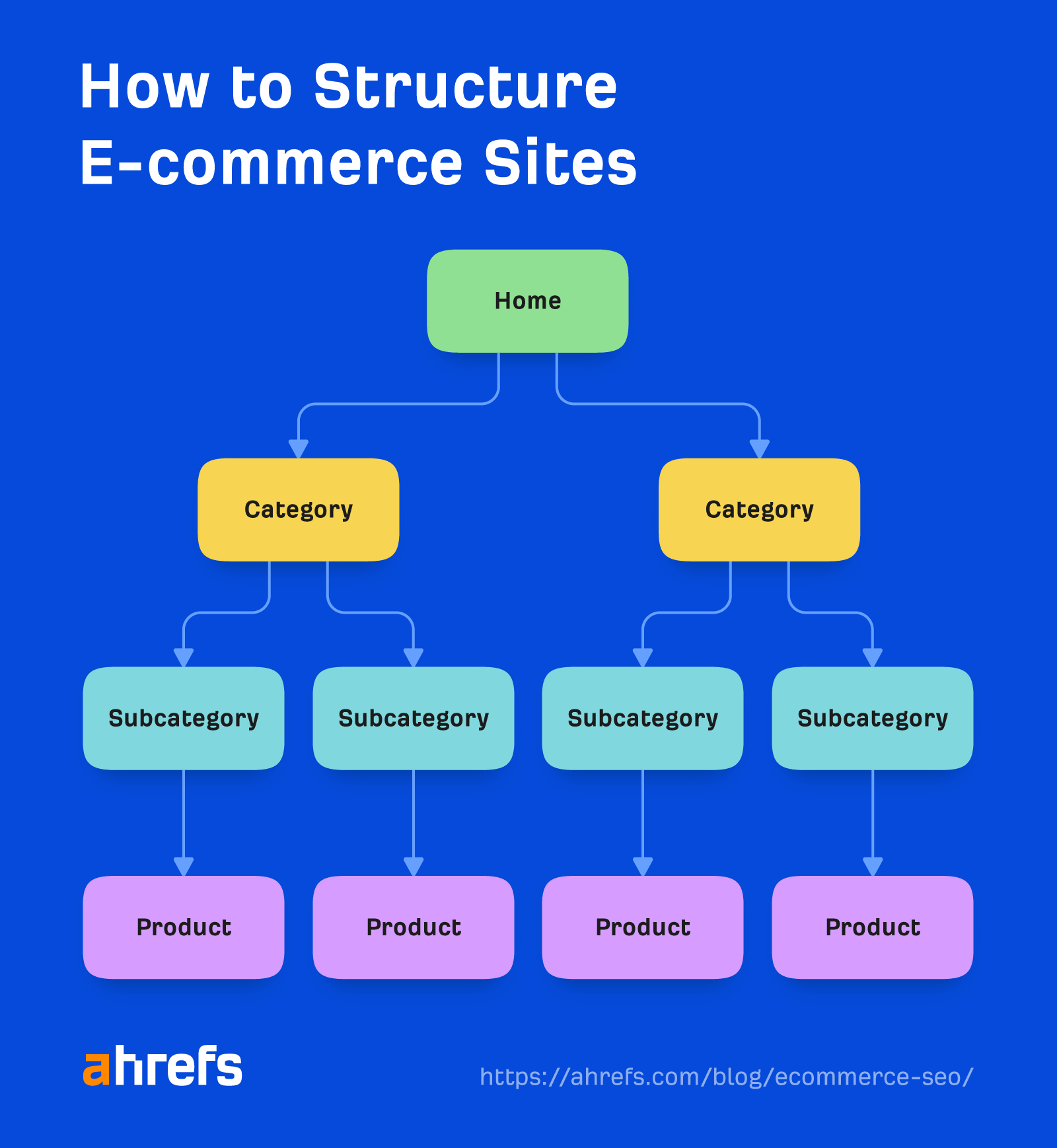
Internal linking is a key part of technical SEO for ecommerce sites. It involves linking your pages to each other. This helps search engines understand your site structure and improves user experience.
Linking Strategies
Effective linking strategies can boost your ecommerce site’s SEO. Here are some strategies:
- Use descriptive anchor text: Make sure the linked text describes the page it points to.
- Link to relevant pages: Always link to pages that are related to the content.
- Deep linking: Link to pages deep within your site, not just the homepage.
- Use a logical hierarchy: Follow a clear structure when linking pages.
- Update old content: Add links to new pages in older blog posts.
Benefits For Seo
Internal linking offers several benefits for your ecommerce SEO:
- Improved crawlability: Search engines find and index your pages easier.
- Better user experience: Users find related products and pages quickly.
- Enhanced page authority: Links distribute page authority across your site.
- Reduced bounce rate: Users stay longer by exploring more pages.
- Increased conversion rates: Engaged users are more likely to make a purchase.
| Strategy | Description |
|---|---|
| Use descriptive anchor text | Ensure linked text describes the destination page. |
| Link to relevant pages | Link only to pages related to the content. |
| Deep linking | Link to pages deep within your site. |
| Use a logical hierarchy | Follow a clear structure when linking. |
| Update old content | Add links to new pages in older posts. |
Duplicate Content
Duplicate Content can hurt your ecommerce SEO. It makes search engines confused. They can’t decide which page to rank. This can lower your website’s visibility. Understanding and fixing duplicate content is crucial for better rankings.
Identifying Issues
First, you need to identify duplicate content. Use tools like Google Search Console. It helps find duplicate meta descriptions and titles.
Other tools like Screaming Frog can also help. They crawl your site and highlight duplicates.
Check product descriptions as well. Many ecommerce sites copy manufacturer descriptions. This leads to duplicate content.
Fixing Duplicates
Once you identify issues, start fixing them. You can use canonical tags. A canonical tag tells search engines which page is original.
Here’s an example of a canonical tag:
Another method is 301 redirects. Redirect duplicate pages to the original page. This consolidates link equity and improves SEO.
You can also use unique product descriptions. Write original content for each product. This avoids duplicates and improves user experience.
Here’s a table summarizing the methods:
| Method | Description |
|---|---|
| Canonical Tags | Tell search engines the original page |
| 301 Redirects | Redirect duplicates to the original page |
| Unique Descriptions | Write original content for each product |
In summary, identify and fix duplicate content to boost your ecommerce SEO. Use tools and methods like canonical tags, redirects, and unique descriptions.
Monitoring And Reporting
Technical SEO for ecommerce requires diligent monitoring and reporting. These processes ensure your site performs optimally. Regular checks help in identifying issues quickly. Consistent reports provide insights into your SEO efforts.
Tracking Performance
Tracking performance is crucial for ecommerce success. You need to monitor various metrics. Here are some key areas to focus on:
- Page Load Speed: Ensure your pages load quickly.
- Mobile Usability: Check how your site performs on mobile devices.
- Crawl Errors: Identify any issues search engines face while crawling your site.
- Index Status: Make sure your pages are properly indexed by search engines.
- Conversion Rates: Track how well your site converts visitors into customers.
Use these metrics to guide your SEO efforts. Make adjustments as needed to improve performance.
Seo Tools
Several SEO tools can help with monitoring and reporting. Here are some popular ones:
| Tool | Features |
|---|---|
| Google Analytics | Tracks visitor behavior and site performance. |
| Google Search Console | Monitors site health and indexing issues. |
| SEMrush | Provides in-depth SEO analysis and competitor insights. |
| Screaming Frog | Identifies technical SEO issues on your site. |
Using these tools will streamline your SEO efforts. You can quickly identify problems and take action.
Regular monitoring and reporting ensure your ecommerce site remains competitive. Track performance, use the right tools, and keep your site optimized.
Frequently Asked Questions
What Is Technical Seo?
Technical SEO involves optimizing a website’s infrastructure for search engines. It includes improving site speed, mobile-friendliness, and crawlability.
Does Seo Work For Ecommerce?
Yes, SEO works effectively for ecommerce. It boosts visibility, drives organic traffic, and increases sales. Optimize product pages and use relevant keywords.
How Do You Conduct Technical Seo?
We conduct technical SEO by optimizing website speed, ensuring mobile-friendliness, fixing broken links, using structured data, and improving site architecture.
How Ecommerce Seo Is Different From Normal Seo?
Ecommerce SEO focuses on optimizing product pages and categories, while normal SEO targets broader content and keywords. Ecommerce SEO requires handling large inventories, product descriptions, and user reviews. It also emphasizes site architecture, rich snippets, and conversion rate optimization. Normal SEO generally involves blogging, backlinking, and overall website authority.
What Is Technical Seo For Ecommerce?
Technical SEO for ecommerce involves optimizing website structure, speed, and performance to improve search engine rankings and user experience.
Conclusion
Mastering technical SEO for ecommerce is crucial for online success. Focus on site speed, mobile optimization, and clean URLs. Regular audits ensure your site stays in top shape. Implementing these strategies can boost your search engine rankings. Stay updated with the latest trends for continuous improvement.
Your ecommerce store’s visibility depends on it.

