

A Technical SEO Audit evaluates a website’s technical aspects to improve its search engine visibility. It identifies issues that hinder performance and rankings.
A technical SEO audit is crucial for any website aiming to rank higher on search engines. It involves examining various elements such as site speed, mobile-friendliness, and crawlability. These factors significantly impact how search engines index and rank your site.
Conducting a thorough audit can uncover hidden issues that may be affecting your site’s performance. By addressing these problems, you can enhance user experience and boost your site’s search engine rankings. Regular audits help maintain optimal website health, ensuring it meets current SEO standards and practices. This proactive approach keeps your site competitive in the ever-evolving digital landscape.
Introduction To Technical Seo
Technical SEO focuses on the technical aspects of a website. It helps search engines crawl and index your site effectively. A well-optimized technical SEO ensures better visibility in search results.
Basics Of Seo
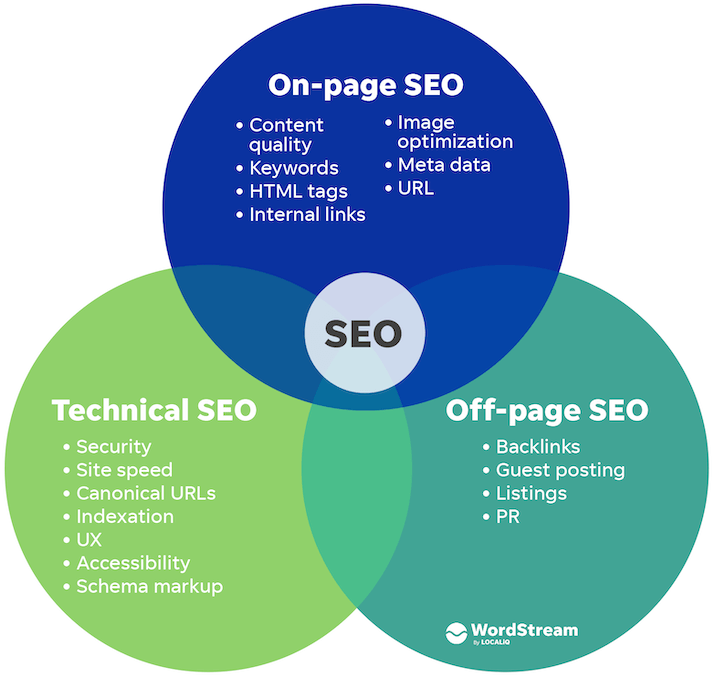
SEO stands for Search Engine Optimization. It improves your website’s ranking on search engines. The main types of SEO include:
- On-Page SEO
- Off-Page SEO
- Technical SEO
On-Page SEO involves optimizing the content on your website. Off-Page SEO focuses on external factors like backlinks. Technical SEO ensures that your website meets the technical requirements of search engines.
Importance Of Technical Seo
Technical SEO is crucial for several reasons. It helps search engines understand your website. It improves site speed and user experience. It ensures your site is mobile-friendly and secure.
Here are key aspects of technical SEO:
| Aspect | Importance |
|---|---|
| Site Speed | Improves user experience and reduces bounce rates |
| Mobile-Friendliness | Ensures accessibility on all devices |
| Site Security | Builds trust with users and search engines |
A Technical SEO audit helps identify and fix technical issues. Regular audits ensure your site remains optimized. This boosts your site’s performance in search results.
Key Components Of Technical Seo
Understanding the key components of Technical SEO is essential for improving your website’s performance. These components ensure that search engines can easily crawl, index, and understand your content. Below, we explore two critical aspects: Crawling and Indexing, and Site Structure.
Crawling And Indexing
Search engines use bots to crawl your website. They look for new and updated content. This process is called crawling. After crawling, search engines add your pages to their index. This is called indexing. Proper crawling and indexing ensure your content shows up in search results.
Key actions to improve crawling and indexing:
- Check your robots.txt file
- Create and update an XML sitemap
- Fix broken links and 404 errors
- Use canonical tags to avoid duplicate content
Site Structure
A well-organized site structure helps search engines and users. It makes it easy to navigate your website. A good structure enhances user experience and improves SEO.
Essential elements of a strong site structure:
- Use clear and descriptive URLs
- Implement breadcrumb navigation
- Ensure a logical hierarchical structure
- Optimize your internal linking
| Component | Description |
|---|---|
| Crawling | Search engine bots scan your site for content. |
| Indexing | Search engines add your pages to their database. |
| Site Structure | Organization of your website’s pages and content. |
Conducting A Site Crawl
A technical SEO audit starts with conducting a site crawl. This helps to find issues affecting your website’s performance. A site crawl scans your site, uncovering problems that could hinder your SEO.
Tools For Site Crawls
Several tools can assist with site crawls. These tools analyze your website and provide detailed reports. Here are some popular options:
- Google Search Console: Free tool that helps identify crawl errors.
- Screaming Frog SEO Spider: Crawls small to large websites efficiently.
- Ahrefs: Offers extensive site audit features.
- SEMrush: Comprehensive tool with site crawl capabilities.
Identifying Crawl Errors
Identifying crawl errors is crucial for improving SEO. Errors prevent search engines from indexing your site properly. Common crawl errors include:
| Error Type | Description |
|---|---|
| 404 Errors | Page not found. Broken links or deleted pages cause this. |
| 500 Errors | Server issues. Website server cannot complete the request. |
| Redirect Errors | Improper redirects. Can confuse search engines. |
Fixing these errors ensures better search engine indexing. Use the tools mentioned to find and resolve these issues.
Optimizing Site Structure
Optimizing your site’s structure is crucial for Technical SEO. A well-organized site helps search engines understand your content. This leads to better rankings and improved user experience. Let’s dive into key aspects of site structure optimization.
Url Structure
The URL structure of your site plays a significant role in SEO. Clean and descriptive URLs are easier for search engines to crawl. They also provide users with a clear idea of the page content.
- Keep URLs short and descriptive.
- Use hyphens to separate words.
- Avoid using special characters.
- Include relevant keywords.
Example:
https://www.example.com/technical-seo-audit/optimizing-site-structureInternal Linking
Internal linking is vital for distributing link equity and guiding users. It helps search engines understand the hierarchy and relationship of your pages.
- Use descriptive anchor text.
- Link to relevant content.
- Ensure all pages are reachable.
- Avoid excessive linking.
Example of internal linking:
Optimizing Site StructureBy focusing on URL structure and internal linking, you can greatly enhance your site’s SEO. These steps help search engines index your content effectively. This results in better rankings and a more user-friendly website.
Improving Site Speed
Improving site speed is crucial for better user experience and SEO performance. Faster websites keep visitors engaged and reduce bounce rates. This section focuses on key aspects to enhance your site’s speed.
Page Load Time
Page load time is the time it takes for a web page to fully display. Faster load times lead to better user satisfaction.
- Minimize HTTP Requests: Reduce the number of elements on your page.
- Enable Compression: Use Gzip to compress files, reducing their size.
- Browser Caching: Store static files in the user’s browser for faster load times.
- Reduce Server Response Time: Aim for a server response time under 200ms.
Image Optimization
Image optimization is essential for faster page load times. Optimized images reduce file size without compromising quality.
- Use Appropriate Formats: Use JPEG for photos and PNG for graphics.
- Compress Images: Use tools like TinyPNG or ImageOptim.
- Lazy Loading: Load images only when they are visible on the screen.
- Responsive Images: Use the
Below is a table summarizing key techniques for image optimization:
| Technique | Description |
|---|---|
| Appropriate Formats | Use JPEG for photos, PNG for graphics. |
| Compress Images | Use tools to reduce file size. |
| Lazy Loading | Load images as they come into view. |
| Responsive Images | Use |
Mobile-friendliness
Mobile-friendliness is vital for modern websites. A technical SEO audit ensures your site works well on mobile devices. This section explores key aspects of mobile-friendliness.
Responsive Design
Responsive design adjusts your website to fit different screen sizes. This is crucial for mobile users. Google favors mobile-friendly sites in search results.
- Flexible grids
- Flexible images
- Media queries
Using these techniques, your website will look good on any device. This improves user experience and boosts SEO rankings.
Mobile Usability Testing
Testing your site’s mobile usability is essential. It identifies issues that could affect users. Tools like Google Mobile-Friendly Test can help. Below are steps for effective testing:
- Analyze page load speed
- Check for touch-friendly buttons
- Ensure readable text sizes
- Verify easy navigation
Addressing these points enhances your site’s mobile performance. This leads to higher user satisfaction and better search rankings.
Fixing Duplicate Content
Duplicate content can hurt your website’s SEO. It confuses search engines and splits link equity. Fixing duplicate content is crucial for your site’s health. Let’s explore how to tackle this issue effectively.
Canonical Tags
Canonical tags help search engines understand the primary version of a page. Adding in your HTML helps. This tag tells search engines which URL to index. It also prevents duplicate content issues.
| Page | Canonical Tag |
|---|---|
| www.example.com/page1 | |
| www.example.com/page1?utm_source=newsletter |
Content Management
Proper content management can prevent duplicate content. Use a Content Management System (CMS) that handles versions and drafts well. Make sure to:
- Keep track of all content versions.
- Regularly update and audit your content.
- Use 301 redirects for outdated pages.
- Avoid publishing similar content across different URLs.
Following these steps ensures your content stays unique and SEO-friendly.

Enhancing Security
Enhancing security is crucial in a technical SEO audit. It ensures your website is safe. A secure site protects user data and builds trust. Let’s explore how to enhance security.
Https Protocol
Using the HTTPS protocol is vital. HTTPS encrypts data between the browser and server. It prevents hackers from stealing information. It’s a ranking factor for search engines too.
To implement HTTPS:
- Buy an SSL certificate from a trusted provider.
- Install the SSL certificate on your web server.
- Update your website URLs to use HTTPS.
- Check for mixed content issues.
Security Best Practices
Follow security best practices to keep your site safe. Here are some key practices:
- Regularly update your software and plugins.
- Use strong passwords for all accounts.
- Enable two-factor authentication (2FA).
- Conduct regular backups of your site.
- Monitor your site for malware and threats.
| Action | Description |
|---|---|
| Update Software | Keep CMS, plugins, and themes up to date. |
| Strong Passwords | Use complex passwords for all accounts. |
| Two-Factor Authentication | Add an extra layer of security to login. |
| Regular Backups | Backup your site data frequently. |
| Monitor for Threats | Use tools to detect and remove malware. |
Implementing these practices enhances your website security. It also boosts your SEO performance.
Schema Markup
Schema Markup is a type of code. It helps search engines understand your content. It can improve your site’s visibility in search results. This structured data tells search engines what your data means. It enhances your search engine result pages (SERPs) with rich snippets.
Types Of Schema
There are many types of Schema Markup. Each type serves a unique purpose.
- Article Schema: Used for blog posts and news articles.
- Product Schema: Best for e-commerce sites to show product details.
- Recipe Schema: Ideal for food bloggers to display cooking instructions.
- Event Schema: Useful for promoting events with dates and locations.
- Local Business Schema: Helps local businesses appear in search results.
Implementing Schema
Implementing Schema Markup can be easy. Follow these steps:
- Choose the type of schema that fits your content.
- Use a Schema Markup generator tool.
- Copy the generated code.
- Paste the code into the HTML of your web page.
- Test your Schema Markup with Google’s Structured Data Testing Tool.
Schema Markup can make your site stand out. It can lead to more clicks and better rankings. Implementing it properly is crucial for your Technical SEO Audit.
Monitoring And Reporting
A Technical SEO Audit is not a one-time task. Monitoring and reporting keep your website optimized. Regular checks ensure your site’s health and performance.
Setting Up Alerts
Setting up alerts is crucial. Alerts notify you about potential issues. Use tools like Google Analytics and Google Search Console.
Follow these steps to set up alerts:
- Log in to Google Analytics.
- Go to the Admin tab.
- Select your desired account and property.
- Click on Custom Alerts under the View column.
- Click on New Alert and set your conditions.
Alerts help you catch errors quickly. Fixing issues early prevents bigger problems.
Regular Audits
Regular audits ensure ongoing optimization. Schedule audits monthly or quarterly. Use tools like Screaming Frog and SEMrush.
Key areas to review during audits:
- Site Speed: Ensure fast loading times.
- Broken Links: Identify and fix 404 errors.
- Meta Tags: Check for missing or duplicate tags.
- Mobile Usability: Ensure a responsive design.
Keep a checklist for each audit. Track changes and improvements. This helps in maintaining the site’s health.
| Tool | Purpose |
|---|---|
| Google Analytics | Monitor traffic and set alerts |
| Google Search Console | Track search performance |
| Screaming Frog | Analyze site structure |
| SEMrush | Comprehensive site audits |
Regular audits and alerts ensure your site remains optimized. Continuous monitoring is key to maintaining site health.
Frequently Asked Questions
What Is Meant By Technical Seo?
Technical SEO refers to optimizing a website’s infrastructure for search engines. It includes improving page speed, mobile-friendliness, and crawlability.
How Long Does A Technical Seo Audit Take?
A technical SEO audit typically takes 2 to 6 weeks. Time varies based on website size and complexity.
What Do You Do In A Seo Audit?
In a SEO audit, I analyze website structure, review keyword usage, assess backlinks, check on-page SEO, and evaluate site performance.
How Much Does A Technical Seo Audit Cost?
A technical SEO audit typically costs between $500 and $5,000. Prices vary based on website size and complexity.
What Is A Technical Seo Audit?
A technical SEO audit evaluates the technical aspects of your website to improve search engine rankings.
Conclusion
A technical SEO audit is crucial for optimizing your website. It identifies issues that may affect your search rankings. Regular audits ensure your site remains user-friendly and search engine optimized. By addressing these issues, you can improve your site’s performance and visibility, ultimately driving more traffic and engagement.

