

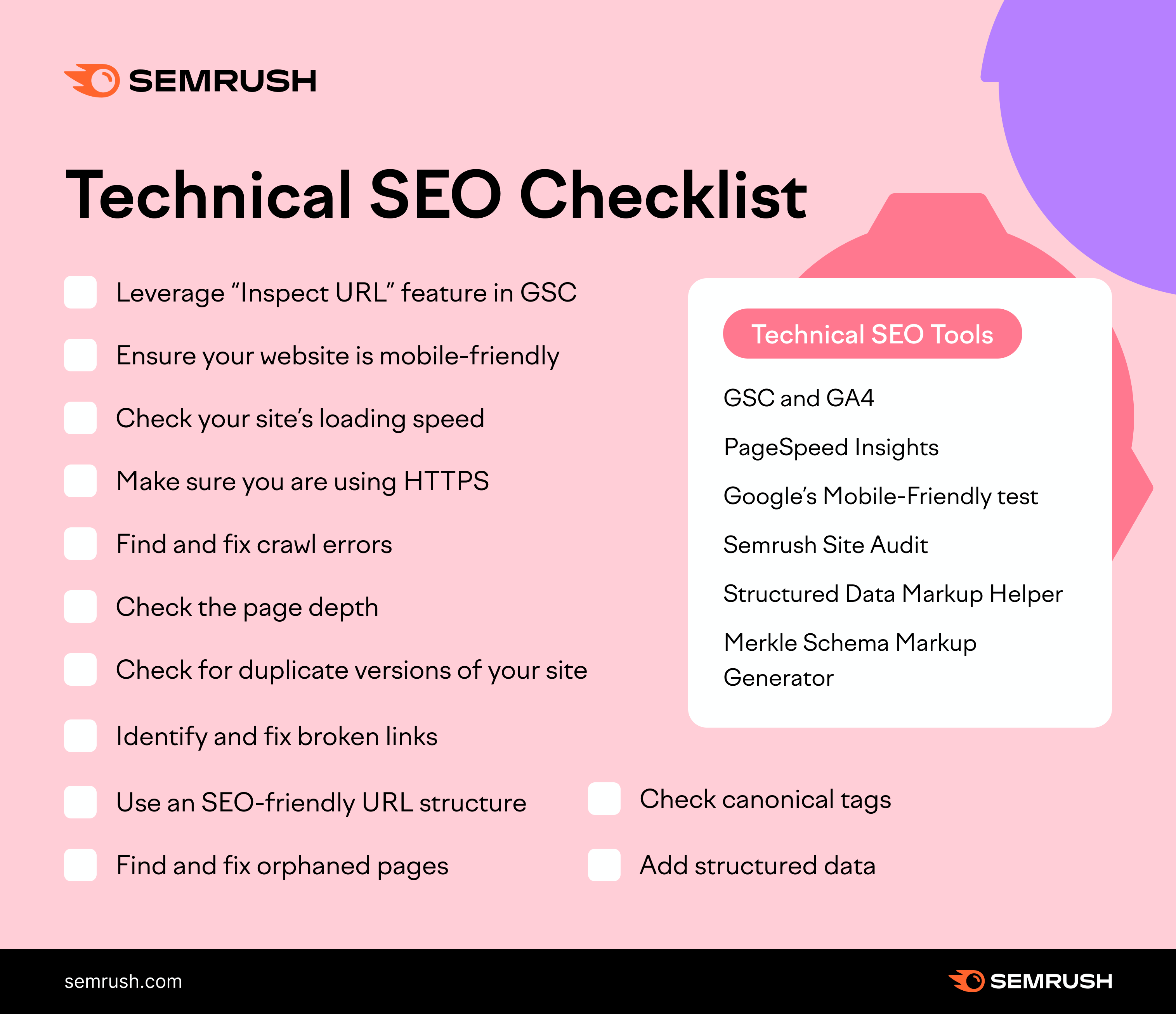
Technical SEO focuses on optimizing the backend of your website. It ensures search engines can crawl and index your site effectively.
Technical SEO is crucial for improving your website’s visibility and performance on search engines. It involves optimizing various elements like site speed, mobile friendliness, and secure connections. Implementing proper technical SEO practices can significantly enhance your website’s user experience and search engine rankings.
Key areas include structured data, XML sitemaps, and fixing crawl errors. Regular audits and updates ensure your site remains optimized for search engines. By focusing on technical SEO, you lay a strong foundation for your overall SEO strategy, making it easier for search engines to understand and rank your content.
Introduction To Technical Seo
Technical SEO is crucial for website success. It involves optimizing the backend of your site. This ensures search engines can crawl and index your website efficiently. A well-optimized site improves user experience and boosts search engine rankings.
Importance Of Technical Seo
Technical SEO is the foundation of your website. It helps search engines understand your site. This increases your chances of ranking higher. A well-structured site enhances user experience. This leads to more traffic and engagement.
Here are some reasons why Technical SEO is important:
- Improves website speed
- Ensures mobile-friendliness
- Fixes crawl errors
- Enhances site security
Key Components
Technical SEO consists of several key components. Each plays a vital role in optimizing your site.
Here is a table that outlines these components:
| Component | Description |
|---|---|
| Site Speed | Ensures fast loading times |
| Mobile Optimization | Makes your site mobile-friendly |
| HTTPS | Secures your website |
| XML Sitemaps | Helps search engines index your site |
| Robots.txt | Guides search engine crawlers |
To improve Technical SEO, consider these steps:
- Improve your site’s loading speed
- Ensure your site is mobile-friendly
- Use HTTPS for security
- Create and submit XML sitemaps
- Optimize your robots.txt file

Website Crawling And Indexing
In the world of Technical SEO, understanding website crawling and indexing is crucial. Search engines use crawlers to scan your website’s pages and index them for search results. Ensuring your website is crawlable and indexable can significantly impact your visibility and ranking.
Crawlability Factors
Search engines need to access and read your website’s pages. Several factors influence crawlability:
- Robots.txt: This file tells crawlers which pages to visit or ignore.
- Sitemap: A sitemap lists all the pages you want indexed.
- Site Structure: A clear structure helps crawlers navigate your site.
- Internal Links: These help distribute link equity across your site.
- Page Load Speed: Faster pages are easier for crawlers to read.
Indexing Best Practices
To ensure your pages are indexed correctly, follow these best practices:
- Unique Content: Each page should have unique, valuable content.
- Meta Tags: Use meta tags to provide information about your pages.
- Canonical Tags: Use these to prevent duplicate content issues.
- Mobile-Friendly: Ensure your site is responsive and mobile-friendly.
- Secure (HTTPS): Use HTTPS to protect your site and users.
Here’s a quick comparison of crawlability and indexing factors:
| Factor | Crawlability | Indexing |
|---|---|---|
| Robots.txt | Yes | No |
| Sitemap | Yes | No |
| Meta Tags | No | Yes |
| Canonical Tags | No | Yes |
| Unique Content | No | Yes |
| Site Structure | Yes | No |
| Internal Links | Yes | No |
| Mobile-Friendly | No | Yes |
| HTTPS | No | Yes |
By focusing on these factors, you can improve your site’s visibility and ranking.
Optimizing Site Speed
Optimizing site speed is crucial for your website’s success. A fast website improves user experience and boosts search engine rankings. Slow websites frustrate users and lead to higher bounce rates. Let’s explore how to optimize your site speed effectively.
Importance Of Speed
Site speed is a critical factor for SEO. Google uses site speed as a ranking factor. A faster site means better SEO performance. Users expect pages to load quickly. A delay of even one second can reduce page views by 11%. It can also decrease customer satisfaction by 16%. Faster sites lead to higher conversion rates.
Tools To Measure Speed
There are several tools available to measure site speed. These tools help identify areas for improvement.
- Google PageSpeed Insights: This tool analyzes your site and provides suggestions for improvement.
- GTmetrix: GTmetrix gives detailed reports on your site’s performance. It also offers recommendations for optimization.
- Pingdom: Pingdom tests your site’s speed from multiple locations around the world. It provides a performance grade and detailed insights.
- WebPageTest: This tool lets you run tests from different browsers and locations. It provides a comprehensive view of your site’s performance.
Using these tools, you can identify the bottlenecks slowing down your site. You can then take steps to improve loading times.
Mobile-friendly Design
Ensuring your website is mobile-friendly is crucial for SEO. Search engines prioritize mobile usability. A mobile-friendly design keeps your audience engaged. Below, we explore key aspects of a mobile-friendly design.
Responsive Design
A responsive design adapts to different screen sizes. It ensures your site looks good on all devices. Use flexible grids and layouts for a responsive design. Images and CSS media queries should adjust based on the screen size.
Here are some tips for responsive design:
- Use a fluid grid layout.
- Optimize images for different screen sizes.
- Apply CSS media queries for different devices.
Mobile Usability Testing
Conduct mobile usability testing to ensure a smooth experience. Testing helps you identify and fix issues. Use tools like Google’s Mobile-Friendly Test. It checks if your site is easy to use on mobile devices.
Steps for mobile usability testing:
- Use a variety of devices for testing.
- Check for touch-friendly elements.
- Ensure fast loading times on mobile.
- Test navigation and links.
| Tool | Purpose |
|---|---|
| Google Mobile-Friendly Test | Checks mobile usability |
| Browser Developer Tools | Simulate different devices |
| PageSpeed Insights | Analyze load times |
By following these practices, you can ensure your website is mobile-friendly. This will help improve your site’s SEO and user experience.
Structured Data And Schema Markup
Structured Data and Schema Markup are essential parts of Technical SEO. They help search engines understand your content better. This improves visibility and click-through rates. Let’s dive into the benefits and how to implement them.
Benefits Of Structured Data
Structured data enhances your content’s appearance in search results. Here are some key benefits:
- Rich Snippets: These make your content stand out.
- Improved Click-Through Rate: Eye-catching results attract more clicks.
- Better Understanding: Search engines understand your content’s context.
- Voice Search Optimization: Enhances content for voice search results.
Implementing Schema Markup
Implementing schema markup can seem daunting, but it’s manageable. Follow these steps:
- Choose the right schema type for your content.
- Use Google’s Structured Data Markup Helper tool.
- Generate the markup and add it to your HTML.
- Test your markup with Google’s Rich Results Test tool.
Here’s an example of a simple schema markup for a blog post:
Adding this code to your HTML can boost your SEO significantly.
Https And Secure Websites
HTTPS and secure websites are crucial for a safe online experience. HTTPS stands for HyperText Transfer Protocol Secure. It ensures that data sent between a browser and a website is encrypted. This means that sensitive information like passwords and credit card numbers are protected from hackers. HTTPS is essential for maintaining user trust and improving search engine rankings.
Advantages Of Https
Switching to HTTPS offers many benefits. Here are some key advantages:
- Improved Security: HTTPS encrypts data, protecting it from cyber threats.
- Better SEO Rankings: Search engines like Google prioritize HTTPS sites.
- Increased Trust: Users feel safer on HTTPS websites.
- Enhanced Privacy: HTTPS keeps user information confidential.
Migrating To Https
Migrating to HTTPS can seem daunting, but it’s manageable with a clear plan. Follow these steps for a smooth transition:
- Obtain an SSL Certificate: Purchase an SSL certificate from a trusted provider.
- Install the Certificate: Install the SSL certificate on your web server.
- Update Links: Change all internal links from HTTP to HTTPS.
- Redirect HTTP to HTTPS: Use 301 redirects to route traffic from HTTP to HTTPS.
- Update External Links: Contact sites that link to your content and ask them to update their links.
- Test and Monitor: Regularly check for mixed content and SSL errors.
Below is a simple table outlining the steps and their importance:
| Step | Description | Importance |
|---|---|---|
| Obtain SSL Certificate | Purchase and verify a certificate | High |
| Install Certificate | Set up the certificate on your server | High |
| Update Links | Change all links to HTTPS | Medium |
| Redirect HTTP to HTTPS | Use 301 redirects | High |
| Update External Links | Request updates from external sites | Low |
| Test and Monitor | Regularly check for errors | High |
Url Structure Optimization
Optimizing your URL structure is crucial for technical SEO. A well-crafted URL boosts your search engine ranking. It also enhances user experience. This section will guide you through best practices and mistakes to avoid.
Best Practices For Urls
Creating the perfect URL involves following some key practices. These guidelines help improve your site’s visibility.
| Practice | Description |
|---|---|
| Keep it short | Avoid long URLs. They confuse users and search engines. |
| Use keywords | Include relevant keywords. It helps in ranking higher. |
| Use hyphens | Separate words with hyphens. It makes URLs readable. |
| Avoid special characters | Special characters can break URLs. Stick to letters and numbers. |
| Lowercase letters | Use lowercase letters only. It avoids confusion. |
Avoiding Common Mistakes
Many site owners make errors in their URL structure. Avoid these to maintain your site’s health.
- Using underscores: Underscores are harder to read. Use hyphens instead.
- Duplicate URLs: Ensure each page has a unique URL. Duplicate URLs split ranking power.
- Dynamic URLs: Avoid URLs with long query strings. Static URLs are better for SEO.
- Ignoring redirects: Always set up proper redirects. It preserves link equity.
- Keyword stuffing: Avoid overloading URLs with keywords. It looks spammy.
Fixing Broken Links
Broken links can harm your website’s user experience and SEO performance. They frustrate users and lead to higher bounce rates. Fixing these links is crucial for maintaining your site’s health and ranking. This section covers how to identify and fix broken links effectively.
Identifying Broken Links
First, you need to identify which links are broken. This process involves checking all the links on your website.
- Manually click each link on your site.
- Use online tools to scan for broken links.
Manually checking links can be time-consuming. Automated tools make this process faster and more efficient.
Tools For Fixing Links
Various tools can help you find and fix broken links. Here are a few popular ones:
| Tool | Description | Price |
|---|---|---|
| Google Search Console | Free tool to find and fix site issues. | Free |
| Broken Link Checker | Online service to scan your website for broken links. | Free and Paid |
| Screaming Frog SEO Spider | Advanced tool for SEO audits, including broken links. | Free and Paid |
Choose a tool that suits your needs and budget. Once you have identified broken links, you can proceed to fix them.
- Replace the broken link with a working one.
- Update the URL if the page has moved.
- Remove the link if the content is no longer available.
Regularly check your site for broken links. This ensures a smooth user experience and helps maintain good SEO.
Xml Sitemaps
XML Sitemaps are crucial for enhancing your website’s technical SEO. These sitemaps help search engines understand your site’s structure. They guide crawlers to find and index your content efficiently. A well-structured XML sitemap can improve your site’s visibility and ranking.
Creating An Xml Sitemap
Creating an XML Sitemap is straightforward. Here are the steps:
- Use a sitemap generator tool. Examples include Yoast SEO, Screaming Frog, and XML-Sitemaps.com.
- Ensure the sitemap includes all your site’s important URLs.
- Save the file as
sitemap.xml. - Upload the
sitemap.xmlfile to your website’s root directory.
Here’s a simple example of an XML sitemap:
xml version="1.0" encoding="UTF-8"?


http://www.example.com/
2023-10-01
monthly
1.0


http://www.example.com/about
2023-10-01
monthly
0.8
Submitting To Search Engines
After creating your XML sitemap, submit it to search engines. This helps them crawl and index your site efficiently.
Here’s how to submit your sitemap to Google:
- Go to Google Search Console.
- Select your website.
- Navigate to Sitemaps under the Index section.
- Enter the path to your sitemap (e.g.,
/sitemap.xml). - Click Submit.
For Bing, follow these steps:
- Visit Bing Webmaster Tools.
- Sign in and select your site.
- Go to Configure My Site and click Sitemaps.
- Enter the URL of your sitemap.
- Click Submit.
Submitting your sitemap ensures search engines can find and index your content quickly.
Robots.txt File
The Robots.txt file is a crucial element in technical SEO. It tells search engine crawlers which pages to access. Proper configuration ensures your site is efficiently indexed and optimized.
Purpose Of Robots.txt
The Robots.txt file serves several important functions. It helps manage crawler traffic to your site. This prevents overloading your server with requests.
- Blocks access to specific pages
- Controls the behavior of search engine crawlers
- Helps in managing search engine crawl budget
For example, you might want to block access to your admin pages. This ensures they are not indexed by search engines.
Configuring Robots.txt
Configuring the Robots.txt file is straightforward. First, create a plain text file named robots.txt. Place it in the root directory of your website.
Here is a basic example:
User-agent:
Disallow: /admin/
Disallow: /login/
This code blocks all crawlers from accessing the /admin/ and /login/ pages.
Use the Disallow directive to block specific pages. You can also use the Allow directive to permit specific pages.
Here is another example:
User-agent: Googlebot
Allow: /public/
Disallow: /private/
This allows Googlebot to access /public/ but blocks /private/.
To verify your Robots.txt file, use Google’s Robots Testing Tool. This ensures it works as intended.
| Directive | Purpose |
|---|---|
User-agent |
Specifies the crawler |
Disallow |
Blocks specific paths |
Allow |
Permits specific paths |
Remember, an incorrect configuration can block essential pages. Always double-check your settings.
Monitoring And Auditing
Monitoring and auditing are essential parts of any technical SEO strategy. These processes help ensure your website performs well in search engines. Regular monitoring identifies issues early. Auditing provides a comprehensive review of your website’s health.
Regular Seo Audits
Regular SEO audits keep your website in top shape. They uncover hidden problems that may affect your rankings. Audits should be scheduled periodically. Aim for quarterly or bi-annual audits for best results.
During an audit, check for the following:
- Broken links
- Page load speed
- Mobile-friendliness
- Meta tags and descriptions
- Duplicate content
Fixing these issues can boost your site’s performance. Also, keep an eye on core web vitals. These metrics are crucial for user experience and SEO.
Tools For Monitoring Performance
Several tools can help monitor your website’s SEO performance. These tools provide valuable insights into your site’s health.
Popular tools include:
| Tool | Function |
|---|---|
| Google Analytics | Tracks website traffic and user behavior |
| Google Search Console | Monitors search performance and indexing issues |
| Ahrefs | Analyzes backlinks and keyword rankings |
| SEMrush | Provides SEO audits and competitive analysis |
| Screaming Frog | Crawls websites for technical issues |
Use these tools to maintain your website’s SEO health. Regular monitoring helps identify and fix issues quickly. This proactive approach ensures your website remains optimized.
Frequently Asked Questions
What Is A Technical Seo Checklist?
A technical SEO checklist includes tasks to optimize website structure, speed, mobile-friendliness, and crawlability for better search engine rankings.
Is Technical Seo Difficult?
Technical SEO can be challenging but manageable. With the right knowledge and tools, it becomes easier. Seek guidance and resources to learn.
What Is Technical Seo?
Technical SEO involves optimizing a website’s infrastructure. It ensures better crawling, indexing, and ranking by search engines. Key aspects include site speed, mobile-friendliness, and secure connections. Proper technical SEO enhances user experience and search engine performance.
What Is Technical Analysis In Seo?
Technical analysis in SEO involves examining website structure, code, and server settings to improve search engine rankings and user experience.
What Is Technical Seo?
Technical SEO optimizes your website’s infrastructure for search engines. It enhances crawlability, indexing, and overall performance.
Conclusion
Mastering technical SEO is crucial for your website’s success. Implement the techniques discussed to boost your search rankings. Regular testing and updates will keep your site optimized. By focusing on technical aspects, you enhance user experience and visibility. Stay proactive and watch your organic traffic grow.

