
To fix technical SEO issues, conduct a thorough website audit and resolve identified problems. Focus on improving site speed, mobile-friendliness, and fixing broken links.
Technical SEO is crucial for enhancing your website’s performance and visibility. It involves optimizing various backend elements to ensure search engines can efficiently crawl and index your site. Start with a comprehensive audit to identify issues like slow loading times, mobile compatibility, and broken links.
Addressing these problems not only improves your search engine ranking but also enhances user experience. Prioritize fixing critical issues first, such as broken links and slow page speeds. Regularly monitoring and updating your site helps maintain optimal performance and keeps it search engine-friendly. Proper technical SEO boosts traffic and increases your site’s credibility.
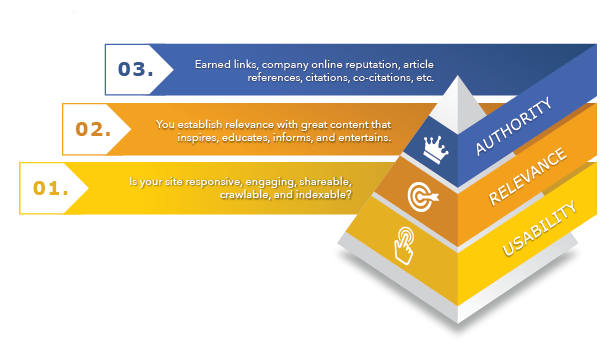
Introduction To Technical Seo
Technical SEO is crucial for website success. It ensures your site is search-engine friendly. Without it, your website may not rank well in search engines. Technical SEO covers various aspects of your site, from sitemaps to mobile friendliness. Understanding these elements helps improve your site’s visibility and performance.
Importance Of Technical Seo
Technical SEO is the backbone of your website. It ensures search engines can crawl and index your site. This step is crucial for achieving high search rankings. A well-optimized site also improves user experience. Fast-loading pages and mobile-friendly designs keep visitors engaged. Poor technical SEO can lead to lower rankings and lost traffic.
Common Technical Seo Issues
- Broken Links: Dead links harm your site’s credibility.
- Slow Page Speed: Slow sites frustrate users and search engines.
- Duplicate Content: Duplicate pages confuse search engines.
- Missing Alt Text: Images without alt text are not accessible.
- Improper Redirects: Bad redirects can lose link equity.
| Issue | Impact | Solution |
|---|---|---|
| Broken Links | Harm credibility | Fix or remove dead links |
| Slow Page Speed | Frustrates users | Optimize images and scripts |
| Duplicate Content | Confuses search engines | Use canonical tags |
| Missing Alt Text | Not accessible | Add descriptive alt text |
| Improper Redirects | Lose link equity | Use 301 redirects |
Conducting A Site Audit
Conducting a site audit is essential for fixing technical SEO issues. It helps identify what is wrong with your website. This will improve your site’s performance and ranking.
Tools For Site Audits
Several tools can help you conduct a site audit. These tools can find issues quickly and efficiently.
| Tool | Features |
|---|---|
| Google Search Console | Tracks site performance, errors, and indexing issues. |
| SEMrush | Provides detailed audit reports and site health scores. |
| Screaming Frog | Crawls websites to find broken links and duplicate content. |
| Ahrefs | Offers comprehensive audit reports and backlink analysis. |
Identifying Critical Issues
After running your site audit, focus on identifying critical issues first. These are problems that affect your site’s performance the most.
- Broken Links: Find and fix broken links to improve user experience.
- Duplicate Content: Remove or consolidate duplicate content to avoid penalties.
- Slow Page Speed: Optimize images and scripts to improve load times.
- Missing Meta Tags: Add missing meta tags to improve SEO.
- Mobile Usability: Ensure your site is mobile-friendly.
Addressing these issues will improve your site’s health. Make sure to regularly conduct site audits to keep your website in top shape.
Improving Site Speed
Site speed is crucial for a good user experience. Faster websites rank higher on search engines. Improving site speed can reduce bounce rates and increase conversions. Here are some effective ways to improve your site’s speed.
Optimizing Images
Images can slow down your website. To speed up your site, optimize your images.
- Use the correct image format. JPEG for photos, PNG for graphics.
- Compress images to reduce file size. Use tools like TinyPNG or ImageOptim.
- Use responsive images. Ensure they display correctly on all devices.
Minifying Css And Javascript
Large CSS and JavaScript files can slow down your site. Minifying these files can improve your site speed.
- Remove unnecessary spaces and comments from your code.
- Use tools like CSSNano and UglifyJS to automate minification.
- Combine multiple CSS and JS files into one. This reduces HTTP requests.
By optimizing images and minifying CSS and JavaScript, you can significantly improve your site speed. Fast-loading websites provide a better user experience and rank higher on search engines. Take these steps to ensure your site is quick and efficient.

Ensuring Mobile-friendliness
Ensuring your website is mobile-friendly is crucial for technical SEO success. More users browse the web on mobile devices. Google also prioritizes mobile-friendly sites in search rankings. This section covers key strategies to ensure your site works well on mobile devices.
Responsive Design
Responsive design adapts your site’s layout to fit different screen sizes. This ensures users have a smooth experience on any device. Use flexible grids, layouts, and CSS media queries. These tools help your site look great on both phones and tablets.
Below is a simple example of a responsive design using CSS:
  @media (max-width: 600px) {
    .container {
      width: 100%;
    }
  }
- Improves user experience
- Increases time spent on site
- Boosts SEO rankings
- Reduces bounce rates
Mobile Usability Testing
Testing your site on mobile devices is essential. Identify and fix usability issues. Tools like Google’s Mobile-Friendly Test can help. They highlight problems and provide solutions.
Follow these steps for effective mobile usability testing:
- Access Google’s Mobile-Friendly Test tool.
- Enter your website URL.
- Analyze the results and fix any issues.
| Issue | Description |
|---|---|
| Text too small | Hard to read on small screens |
| Clickable elements too close | Difficult to tap on touchscreens |
| Viewport not set | Content doesn’t scale properly |
Regular testing ensures your site remains mobile-friendly. Users get a great experience, and your SEO rankings improve.
Fixing Crawl Errors
Crawl errors can hurt your site’s performance in search engines. They stop search engines from indexing your content. This means less visibility for your site. Fixing these errors can improve your site’s SEO.
Understanding Crawl Errors
Crawl errors occur when a search engine tries to reach a page but fails. They can be of two types:
- Site Errors: Affect the entire website.
- URL Errors: Affect specific pages.
Common causes include server errors, DNS issues, and missing pages. Identifying these errors is the first step to fixing them.
Resolving Crawl Issues
Follow these steps to fix crawl issues:
- Check Google Search Console: Go to the ‘Coverage’ report. Look for errors listed under ‘Error’ and ‘Excluded’.
- Fix Server Errors: Ensure your server is up and running. Check for any server-side issues.
- Correct DNS Issues: Ensure your DNS settings are correct. Use tools like DNS Checker to verify.
- Resolve 404 Errors: Redirect missing pages using 301 redirects. Create custom 404 pages to guide users.
- Update Sitemap: Submit an updated sitemap in Google Search Console. This helps search engines find your pages.
Use these steps to fix your site’s crawl issues. This will improve your site’s SEO.

Optimizing Url Structure
Optimizing URL structure is crucial for Technical SEO. A well-structured URL improves search engine visibility. It also enhances user experience. In this section, we’ll explore two essential aspects: creating SEO-friendly URLs and using canonical tags.
Creating Seo-friendly Urls
SEO-friendly URLs help search engines understand your content. They also make it easier for users to remember. Here are some tips to create effective URLs:
- Keep URLs short and descriptive: Short URLs are easier to read and share.
- Use hyphens to separate words: Hyphens improve readability and SEO.
- Include relevant keywords: Keywords in URLs improve search engine ranking.
- Avoid special characters: Stick to letters, numbers, and hyphens.
- Use lowercase letters: This avoids confusion and ensures consistency.
Using Canonical Tags
Canonical tags help prevent duplicate content issues. They tell search engines which URL is the master copy. Here’s how to use them effectively:
- Identify duplicate content: Find pages with similar content.
- Add a canonical tag: Place the tag in the HTML head section of the duplicate pages.
- Point to the preferred URL: The tag should link to the main version of the content.
- Check for accuracy: Ensure that the canonical tags point to the correct URL.
Here’s a sample code for a canonical tag:
Using canonical tags correctly improves SEO and helps search engines index your content accurately.
Enhancing Site Security
Enhancing site security is crucial for fixing technical SEO issues. A secure website protects user data and builds trust. Search engines prioritize secure sites, boosting your rankings. Let’s explore how to enhance your site’s security.
Implementing Https
HTTPS encrypts the data between your site and users. It prevents unauthorized access. Search engines favor HTTPS sites, leading to better rankings. Implementing HTTPS is straightforward. Obtain an SSL certificate from a trusted provider. Install the certificate on your web server. Update all internal links to use HTTPS. Ensure that external resources like images and scripts also use HTTPS.
| Step | Action |
|---|---|
| 1 | Get an SSL certificate |
| 2 | Install the certificate |
| 3 | Update internal links |
| 4 | Ensure external resources use HTTPS |
Regular Security Audits
Regular security audits identify vulnerabilities before they can be exploited. These audits should be scheduled frequently. Use tools like Google Search Console and SEMrush for comprehensive checks.
- Check for outdated software and plugins.
- Scan for malware and potential threats.
- Review user permissions and access controls.
- Ensure that the site complies with security best practices.
Address any issues found during the audit promptly. Regular security audits keep your site safe and maintain user trust.
Improving Internal Linking
Improving internal linking is vital for your website’s SEO. Internal links help search engines understand your site’s structure. They also guide users to related content, enhancing their experience. Let’s explore some effective strategies for improving internal linking.
Strategic Internal Links
Strategic internal links connect relevant pages within your site. This boosts both user experience and SEO. Prioritize linking to high-authority pages. These pages usually have more backlinks and higher traffic.
Use anchor text that clearly describes the linked page. This helps users and search engines understand the link’s content. For example, use “learn more about SEO best practices” instead of “click here”.
Here’s a simple way to add strategic internal links:
- Identify your most important pages.
- Find related content on your site.
- Add links using descriptive anchor text.
Avoiding Broken Links
Broken links harm your site’s SEO and user experience. They occur when a linked page is deleted or moved. Regularly check your site for broken links.
You can use tools like Google Search Console or Ahrefs to find broken links. Fix them by updating or removing the link.
Here’s a quick guide to fixing broken links:
- Identify broken links using a tool.
- Update the link to the correct page.
- If the page no longer exists, remove the link.
Keeping your internal links active ensures a smooth user journey. It also signals to search engines that your site is well-maintained.
Leveraging Structured Data
Structured data helps search engines understand your content better. It provides context and improves visibility. Schema markup is a type of structured data used to enhance SEO. Let’s explore how to use it effectively.
Introduction To Schema Markup
Schema markup is a code added to your website. It helps search engines understand your content. Schema.org provides a list of types and properties.
Here is an example of schema markup:
Adding this code to your HTML helps search engines.
Implementing Rich Snippets
Rich snippets are enhanced search results. They display additional information. This can include ratings, reviews, or prices.
To implement rich snippets, use schema markup. Here is an example of a review snippet:
Including this can boost your search rankings. It can also increase click-through rates.
Monitoring And Maintenance
Fixing technical SEO issues is not a one-time task. It requires ongoing monitoring and maintenance. This helps to ensure your website remains optimized. Regular checks can catch new issues early. This section covers effective strategies for maintaining your site’s SEO health.
Regular Seo Audits
Conducting regular SEO audits is crucial. These audits help identify new issues. Use tools like Google Search Console and SEMrush. They provide detailed reports. Look for broken links, duplicate content, and slow page speeds. Fix these issues promptly.
Regular audits help maintain your site’s health. They ensure your site meets current SEO standards. Schedule audits monthly or quarterly.
| SEO Tool | Feature | Frequency |
|---|---|---|
| Google Search Console | Site Errors | Weekly |
| SEMrush | SEO Audit | Monthly |
| Ahrefs | Backlink Analysis | Monthly |
Staying Updated With Seo Trends
SEO rules change frequently. Staying updated with SEO trends is essential. Follow industry blogs and forums. Join SEO communities on social media. Subscribe to newsletters from SEO experts.
Google often updates its algorithms. These updates can impact your site. Stay informed to adapt quickly. Implement changes as needed. This keeps your site in good standing.
- Read SEO blogs
- Join SEO forums
- Subscribe to newsletters
- Follow SEO experts on social media
Continuous learning is key. It helps you stay ahead of competitors. Your site’s SEO health will improve. Always be proactive, not reactive.
Frequently Asked Questions
How To Fix Seo Problems?
Identify keywords, optimize meta tags, improve site speed, create quality content, and build backlinks for better SEO.
How Do You Optimize Technical Seo?
Optimize technical SEO by improving site speed, using structured data, ensuring mobile-friendliness, fixing broken links, and optimizing URL structure.
How Can I Find Technical Seo Errors?
Use tools like Google Search Console, Screaming Frog, or Ahrefs to identify technical SEO errors on your site.
Is Technical Seo Difficult?
Technical SEO can be challenging, but with the right knowledge and tools, it becomes manageable. It requires ongoing learning.
What Are Technical Seo Issues?
Technical SEO issues are problems affecting website performance, crawlability, indexing, or user experience.
Conclusion
Fixing technical SEO issues is crucial for better website performance. Regular audits help identify and resolve problems. Implementing best practices ensures improved search engine rankings. Stay updated with SEO trends for ongoing success. Consistent efforts in technical SEO will lead to a more robust online presence and increased traffic.
