

A Technical SEO check ensures your website’s infrastructure is optimized for search engines. It enhances crawlability, indexing, and overall performance.
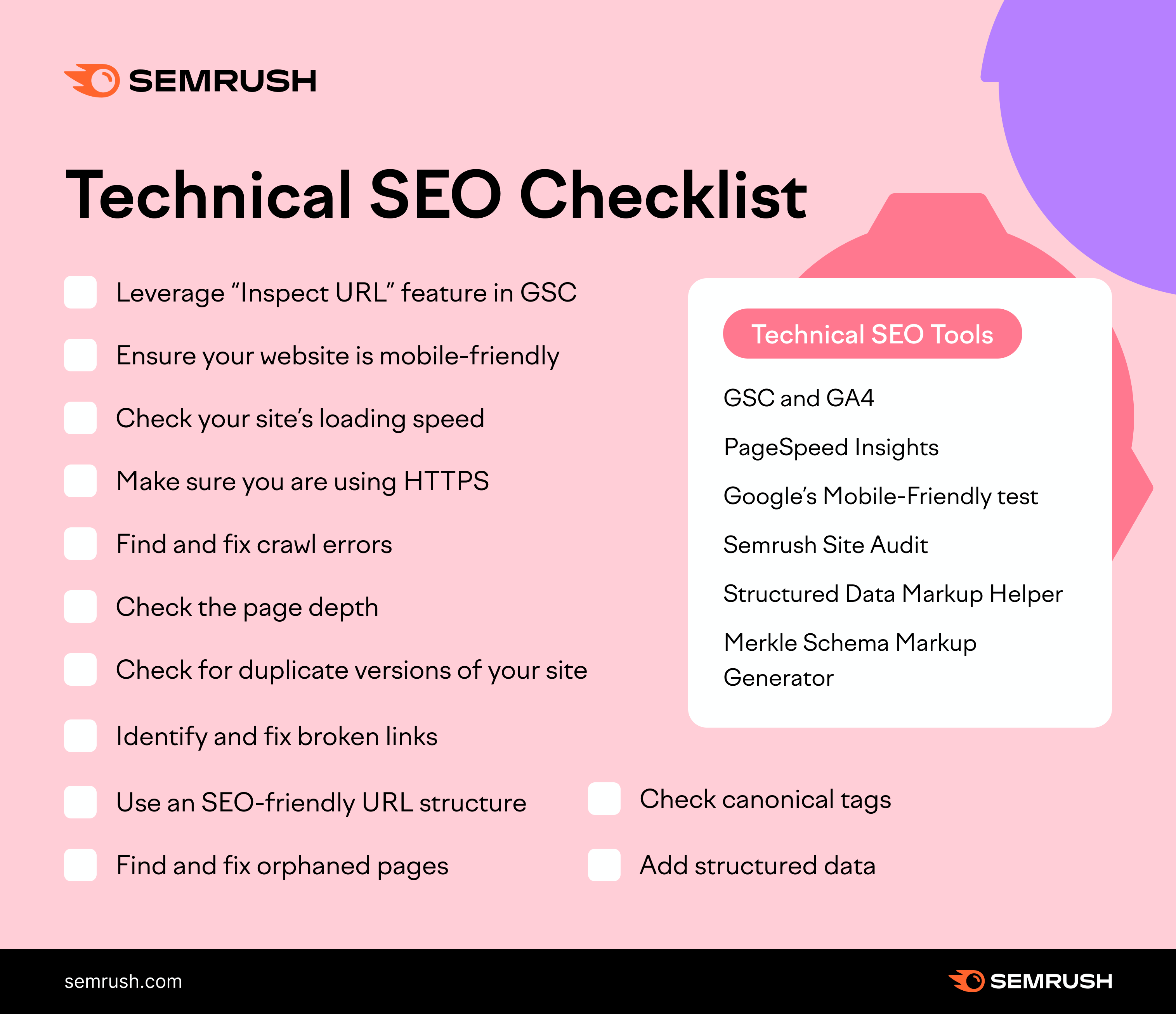
To start, a Technical SEO audit examines server issues, site speed, mobile-friendliness, and crawl errors. Search engines prioritize well-structured websites, so fixing broken links, optimizing XML sitemaps, and implementing HTTPS are crucial. Tools like Google Search Console help identify and resolve these issues.
An optimized robots. txt file ensures search engines access important pages. Schema markup improves search engine understanding of content. Regular technical SEO checks maintain high rankings, providing a seamless user experience. Prioritizing these elements boosts visibility and drives organic traffic, essential for a competitive online presence.
Introduction To Technical Seo
Understanding Technical SEO is crucial for any website owner. It involves optimizing your website for search engines. This ensures that search engines can crawl and index your site efficiently. Technical SEO focuses on the backend of your website. It deals with elements that improve search visibility.
Importance Of Technical Seo
Technical SEO is important because it lays the foundation for your website. A well-optimized site helps search engines understand your content. This leads to better indexing and higher rankings. Without technical SEO, your great content might go unnoticed.
A website with good technical SEO loads faster. Speed is a key factor in user experience. Users are more likely to stay on your site if it loads quickly. This reduces bounce rates and increases engagement.
Technical SEO also ensures your site is mobile-friendly. More people use smartphones to browse the web. A mobile-friendly site improves user experience and ranking.
How Technical Seo Impacts Rankings
Technical SEO directly impacts your search engine rankings. A well-structured site is easier for search engines to crawl. This helps in better indexing of your web pages.
Here are key factors that influence rankings:
- Page Speed: Faster pages rank better.
- Mobile-Friendliness: Mobile-friendly sites get prioritized.
- Secure HTTPS: Secure sites are favored by search engines.
- XML Sitemap: Helps search engines find your pages.
Technical SEO ensures that your site architecture is clean. A well-structured site helps search engines understand your content better. This leads to higher rankings and better visibility.
In summary, focusing on technical SEO is essential for better rankings. It enhances user experience and improves search engine visibility.
Website Crawlability
Website crawlability is a vital part of technical SEO. It ensures search engines can index your site. If search engines can’t crawl your site, it won’t rank well. Let’s explore some key elements for improving website crawlability.
Robots.txt File
The robots.txt file guides search engines on which pages to crawl. It is a simple text file in your site’s root directory. Ensure it is correctly configured to avoid blocking important pages.
- Allow search engines to crawl your main pages.
- Disallow non-essential pages to save crawl budget.
- Use specific directives for better control.
  User-agent:
  Disallow: /admin/
  Allow: /blog/
Sitemap Optimization
A sitemap lists all the URLs on your site. It helps search engines find and index your content. An optimized sitemap can improve your site’s crawlability and SEO.
| Best Practices | Details |
|---|---|
| Include all important pages | Ensure all key URLs are in the sitemap. |
| Update regularly | Keep the sitemap current with new content. |
| Submit to search engines | Submit your sitemap via Google Search Console. |
Use tools like XML-Sitemaps.com to create and validate your sitemap. An optimized sitemap enhances crawl efficiency and helps rank your site better.
Site Architecture
Site architecture is crucial for your website’s technical SEO. It helps search engines understand and rank your site better. A well-structured site enhances user experience, making it easy for visitors to navigate. Below, we explore key elements of site architecture: URL Structure and Breadcrumb Navigation.
Url Structure
Your URL structure should be simple and descriptive. A clear URL helps search engines and users understand the page content. Use hyphens to separate words for better readability.
Follow these tips for an effective URL structure:
- Keep URLs short and straightforward.
- Include relevant keywords in the URL.
- Avoid using special characters and numbers.
Here’s an example of a good URL structure:
https://www.example.com/blog/technical-seo-check
Breadcrumb Navigation
Breadcrumb navigation provides a trail for users to follow. It shows the path from the homepage to the current page. This feature enhances user experience and helps search engines understand your site hierarchy.
Benefits of breadcrumb navigation:
- Improves site usability.
- Reduces bounce rates.
- Helps with internal linking.
Here’s an example of breadcrumb navigation:
Home > Blog > Technical SEO Check > Site Architecture
By focusing on URL structure and breadcrumb navigation, you can significantly improve your site’s architecture. This makes your website more accessible to both users and search engines.
Mobile Optimization
Mobile optimization is crucial for improving your site’s visibility. A well-optimized site offers a seamless experience for mobile users. Search engines prioritize mobile-friendly websites. Focus on delivering a fast, responsive, and user-friendly mobile experience.
Responsive Design
A responsive design ensures your site adapts to different screen sizes. This adaptability improves user experience on various devices.
Key Benefits of Responsive Design:
- Improves user experience
- Boosts SEO rankings
- Reduces bounce rates
To achieve a responsive design, use flexible grids and layouts. Ensure images and other media scale appropriately.
Mobile-friendly Testing
Testing your site for mobile-friendliness is essential. Use Google’s Mobile-Friendly Test tool. It provides insights into your site’s performance on mobile devices.
Steps to Test Your Site:
- Enter your site URL in the tool
- Click “Test URL”
- Review the results
Address any issues highlighted by the tool. Common issues include small text, clickable elements too close together, and unplayable content.
Common Mobile Optimization Issues:
| Issue | Solution |
|---|---|
| Small Text | Increase font size |
| Clickable Elements Too Close | Space out buttons and links |
| Unplayable Content | Use supported media formats |
Mobile-friendly sites perform better in search results. Ensure your site passes all mobile-friendly tests. This will improve both user experience and SEO.
Page Speed
Page speed is a crucial factor in technical SEO. A fast-loading website enhances user experience and boosts search engine rankings. Slow loading pages can lead to high bounce rates and lost opportunities. Optimizing page speed should be a top priority for webmasters.
Load Time Optimization
Reducing load time is essential for a better user experience. Here are some effective strategies:
- Minimize HTTP requests: Fewer requests mean faster load times.
- Optimize images: Compress and resize images without losing quality.
- Use browser caching: Store frequently accessed files locally for quicker loading.
- Minify CSS, JavaScript, and HTML: Remove unnecessary characters and comments.
- Enable compression: Use Gzip to compress files and reduce server response time.
Core Web Vitals
Core Web Vitals are specific factors that Google considers essential for a healthy website. These metrics measure user experience and include:
| Metric | Description |
|---|---|
| Largest Contentful Paint (LCP): | Measures loading performance. Aim for LCP within 2.5 seconds. |
| First Input Delay (FID): | Measures interactivity. Aim for FID of less than 100 milliseconds. |
| Cumulative Layout Shift (CLS): | Measures visual stability. Aim for CLS of less than 0.1. |
Optimizing these metrics ensures a smooth and engaging user experience, leading to better SEO performance.
Https And Security
HTTPS is vital for website security and SEO performance. It encrypts data between the server and the user. This ensures that sensitive information remains private. It also boosts trust with your audience. Search engines prioritize secure websites, impacting your rankings. Let’s dive into key aspects of HTTPS and Security.
Ssl Certificates
SSL Certificates are essential for enabling HTTPS. They encrypt data, keeping it safe from hackers. Here are key points about SSL Certificates:
- SSL stands for Secure Sockets Layer.
- It authenticates the website’s identity.
- SSL Certificates come in different types: Domain Validation (DV), Organization Validation (OV), and Extended Validation (EV).
- DV SSL: Validates domain ownership, quick to obtain.
- OV SSL: Provides higher assurance by validating the organization.
- EV SSL: Offers the highest level of security and trust.
Implementing SSL Certificates is straightforward. You can follow these steps:
- Purchase an SSL Certificate from a trusted provider.
- Install the SSL Certificate on your web server.
- Update your website URLs to HTTPS.
- Test your website for any mixed content issues.
Secure Hosting
Secure Hosting is critical for maintaining website security. Here’s why it’s important:
- Protects your website from cyberattacks.
- Ensures data integrity and confidentiality.
- Provides regular backups to prevent data loss.
Consider the following features for secure hosting:
| Feature | Description |
|---|---|
| Firewall Protection | Blocks unauthorized access to your website. |
| DDoS Protection | Prevents distributed denial-of-service attacks. |
| Regular Backups | Ensures data can be restored if compromised. |
| Malware Scanning | Detects and removes malicious software. |
Choosing a reliable hosting provider is crucial. Look for providers with strong security measures and good customer support. Secure hosting protects your site and enhances user trust.
Duplicate Content Issues
Duplicate content issues can hurt your website’s search engine rankings. Search engines dislike content that appears in multiple places. This confusion can lead to lower rankings or penalties. Let’s explore some ways to tackle duplicate content issues.
Canonical Tags
Using canonical tags helps search engines understand the preferred version of a webpage. A canonical tag is an HTML element placed in the section of a webpage. It looks like this:
This tag tells search engines that the specified URL is the master copy of the page. It helps consolidate link signals for duplicate or similar content.
Content Audits
Regular content audits help identify and resolve duplicate content. During a content audit, check all pages for duplicated material. Here’s a simple checklist:
- Identify pages with similar content.
- Use canonical tags to set a preferred page.
- Rewrite content to make it unique.
- Check for duplicate meta tags and descriptions.
Tools like Google Search Console and Screaming Frog can assist in your audit process. Below is a table summarizing key actions:
| Action | Tool |
|---|---|
| Identify Duplicate Pages | Google Search Console |
| Analyze Meta Tags | Screaming Frog |
| Rewrite Content | Content Management System (CMS) |
Fixing duplicate content issues can boost your website’s SEO performance.

Structured Data
Structured Data is a critical element of Technical SEO. It helps search engines understand your content better. This can lead to improved search engine rankings and more visibility.
Schema Markup
Schema Markup is a type of structured data. It provides additional context to search engines. This can help your site appear in relevant search results.
Schema Markup can be added to your HTML. It uses a specific vocabulary. This vocabulary is recognized by major search engines like Google, Bing, and Yahoo.
Here is an example of Schema Markup code:
{
  "@context": "https://schema.org",
  "@type": "Article",
  "headline": "Technical SEO Check: Structured Data",
  "author": "John Doe",
  "datePublished": "2023-10-01"
}
Rich Snippets
Rich Snippets are enhanced search results. They use structured data to show extra information. This can include reviews, ratings, or images.
Rich Snippets make your content stand out. This can improve your click-through rate (CTR).
Here are some common types of Rich Snippets:
- Review Snippets – Display star ratings and reviews.
- Product Snippets – Show product details and prices.
- Recipe Snippets – Include cooking times, ingredients, and ratings.
Adding structured data to your site can generate Rich Snippets. This can be done through Schema Markup.
Here is a table summarizing the benefits of Rich Snippets:
| Benefit | Description |
|---|---|
| Higher CTR | Attracts more clicks from search results. |
| Increased Visibility | Makes your content more noticeable. |
| Enhanced User Experience | Provides useful information at a glance. |
Xml Sitemaps
XML sitemaps play a crucial role in technical SEO. They help search engines understand your website structure. This makes it easier for them to crawl your site. A well-structured sitemap improves your site’s visibility. Let’s dive into the process of creating and submitting XML sitemaps.
Generating Sitemaps
Generating XML sitemaps is straightforward. You can use various tools to create them. Popular tools include:
- Yoast SEO
- Google XML Sitemaps
- Screaming Frog
Each tool offers unique features. Choose one that suits your needs. Here are the steps for using Yoast SEO:
- Install and activate the Yoast SEO plugin.
- Go to the SEO tab in your WordPress dashboard.
- Click on ‘General’ and then ‘Features’.
- Turn on the ‘XML sitemaps’ feature.
- Click ‘Save Changes’.
Yoast SEO will generate the sitemap automatically. You can view it by adding /sitemap_index.xml to your domain.
Submitting To Search Engines
After generating the sitemap, submit it to search engines. This ensures they can crawl your site efficiently. Here’s how to submit your sitemap to Google:
- Open Google Search Console.
- Select your website property.
- Navigate to ‘Sitemaps’ under the ‘Index’ section.
- Enter the sitemap URL in the ‘Add a new sitemap’ box.
- Click ‘Submit’.
You should also submit your sitemap to Bing. The process is similar. Visit Bing Webmaster Tools and follow these steps:
- Log in to Bing Webmaster Tools.
- Select your site property.
- Go to ‘Sitemaps’ under the ‘Configure My Site’ section.
- Enter your sitemap URL.
- Click ‘Submit’.
Submitting your sitemap helps search engines understand your site. It improves your SEO performance.
Indexation
Indexation is vital for your website’s visibility on search engines. It ensures your web pages are discoverable. If search engines can’t index your pages, they won’t appear in search results. Proper indexation improves your site’s SEO performance.
Indexing Status
Indexing Status shows which of your pages are indexed. Use tools like Google Search Console. Check the number of indexed pages. Compare it with the total pages on your site.
If there is a big difference, investigate further. Look for pages blocked by robots.txt. Ensure there are no errors in your sitemap. Use the Coverage report in Google Search Console.
Fixing Indexing Errors
Fixing Indexing Errors is crucial. Identify pages that are not indexed. Common issues include:
- Blocked by robots.txt
- Noindex tag
- Crawl errors
- Duplicate content
Resolve these issues to improve indexation. Ensure important pages are not blocked. Remove the noindex tag from crucial pages. Fix crawl errors using Google Search Console. Address duplicate content to avoid penalties.
| Error Type | Solution |
|---|---|
| Blocked by robots.txt | Update robots.txt file |
| Noindex tag | Remove noindex tag |
| Crawl errors | Fix crawl issues via Search Console |
| Duplicate content | Use canonical tags |
Regularly check your indexation status. Fix errors promptly to maintain good SEO health. Proper indexation ensures your site ranks well.
Monitoring And Reporting
Monitoring and reporting are crucial for effective Technical SEO checks. Keeping track of your website’s performance helps you identify issues quickly. Regularly monitoring helps maintain your site’s health, ensuring consistent traffic and rankings.
Seo Tools
Using the right SEO tools is essential for monitoring your website. Tools like Google Analytics, Google Search Console, and Ahrefs provide valuable insights.
- Google Analytics: Tracks visitor behavior and website performance.
- Google Search Console: Monitors indexing status and search queries.
- Ahrefs: Analyzes backlinks and keyword rankings.
These tools help you understand what’s working and what needs improvement. Regularly check these tools to stay updated.
Regular Audits
Conducting regular audits ensures your website stays optimized. Audits help identify technical issues, broken links, and performance problems. Use tools like Screaming Frog and SEMrush for comprehensive audits.
- Screaming Frog: Crawls your site to find technical issues.
- SEMrush: Provides detailed reports on site performance.
Regular audits help maintain your site’s health and improve user experience. Set a schedule for audits to keep your site in top shape.

Frequently Asked Questions
How To Check Technical Seo?
To check technical SEO, use tools like Google Search Console, Screaming Frog, or SEMrush. Analyze site speed, mobile-friendliness, and crawl errors. Optimize XML sitemaps and robot. txt files. Ensure proper URL structure and meta tags. Regularly monitor and update.
What Is An Seo Check?
An SEO check evaluates a website’s optimization for search engines. It identifies issues affecting rankings, like keywords, content quality, and backlinks.
What Is Technical Seo?
Technical SEO optimizes a website’s infrastructure for search engines. It includes improving site speed, mobile-friendliness, and crawlability. Proper technical SEO ensures better indexing and higher rankings.
How To Run A Technical Seo Audit?
To run a technical SEO audit, follow these steps: check site speed, ensure mobile-friendliness, fix broken links, optimize metadata, and analyze site structure.
What Is Technical Seo?
Technical SEO involves optimizing your website’s infrastructure for search engines. It includes site speed, mobile-friendliness, and secure connections.
Conclusion
Mastering technical SEO is crucial for your website’s success. Regular audits ensure optimal performance and improved search rankings. Implement these strategies, and you’ll see significant improvements. Stay updated with SEO trends to maintain your competitive edge. Your website’s health and visibility depend on thorough technical SEO checks.
Start optimizing today for better results.

