

To improve SEO on Shopify, optimize your product descriptions and use relevant keywords. Ensure your website is mobile-friendly and fast.
Improving SEO on Shopify is essential for driving organic traffic and increasing sales. Start by researching and integrating relevant keywords into your product titles, descriptions, and tags. Ensure your site loads quickly, as page speed is a significant ranking factor.
Use high-quality images with descriptive alt texts to boost visibility in image searches. Create informative and engaging blog content to attract and retain visitors. Ensure your website is mobile-friendly, as many users shop on their phones. Regularly update your content and fix any broken links to maintain a healthy site. These steps can significantly enhance your Shopify store’s SEO performance.
Keyword Research
Keyword research is the foundation of any successful SEO strategy on Shopify. Identifying the right keywords can drive traffic and boost sales. This section will guide you through effective keyword research techniques.
Finding Relevant Keywords
Finding relevant keywords is crucial for your Shopify store’s success. Start by using tools like Google Keyword Planner or Ahrefs. These tools help identify what people search for online.
Make a list of keywords related to your products. For example, if you sell handmade candles, consider keywords like “handmade candles” or “scented candles”.
Check out your competitors’ websites. Look at the keywords they target. This will give you insights into popular search terms in your niche.
Using Long-tail Keywords
Long-tail keywords are longer and more specific phrases. They usually have less competition and higher conversion rates. For instance, instead of “candles,” use “organic lavender-scented candles.”
Use long-tail keywords in your product descriptions, titles, and meta tags. They help attract customers looking for specific products.
| Keyword | Search Volume | Competition |
|---|---|---|
| handmade candles | 5,000 | High |
| organic lavender-scented candles | 1,000 | Low |
Incorporate your chosen keywords naturally into your content. Avoid keyword stuffing, as it can harm your SEO efforts. Focus on delivering value to your readers while using keywords strategically.
On-page Optimization
On-page optimization is essential for improving SEO on your Shopify store. It involves optimizing elements within your website to rank higher in search results. By focusing on key aspects like title tags and meta descriptions, you can significantly enhance your site’s visibility.
Optimizing Title Tags
Title tags are crucial for SEO. They tell search engines and users what your page is about. To optimize title tags:
- Include your primary keyword.
- Keep the title under 60 characters.
- Make it descriptive and unique.
- Add your brand name at the end.
For example, if you sell organic coffee, a good title tag would be: “Buy Organic Coffee Online | YourBrandName”.
Writing Effective Meta Descriptions
Meta descriptions provide a brief summary of your page. They appear below the title in search results. To write effective meta descriptions:
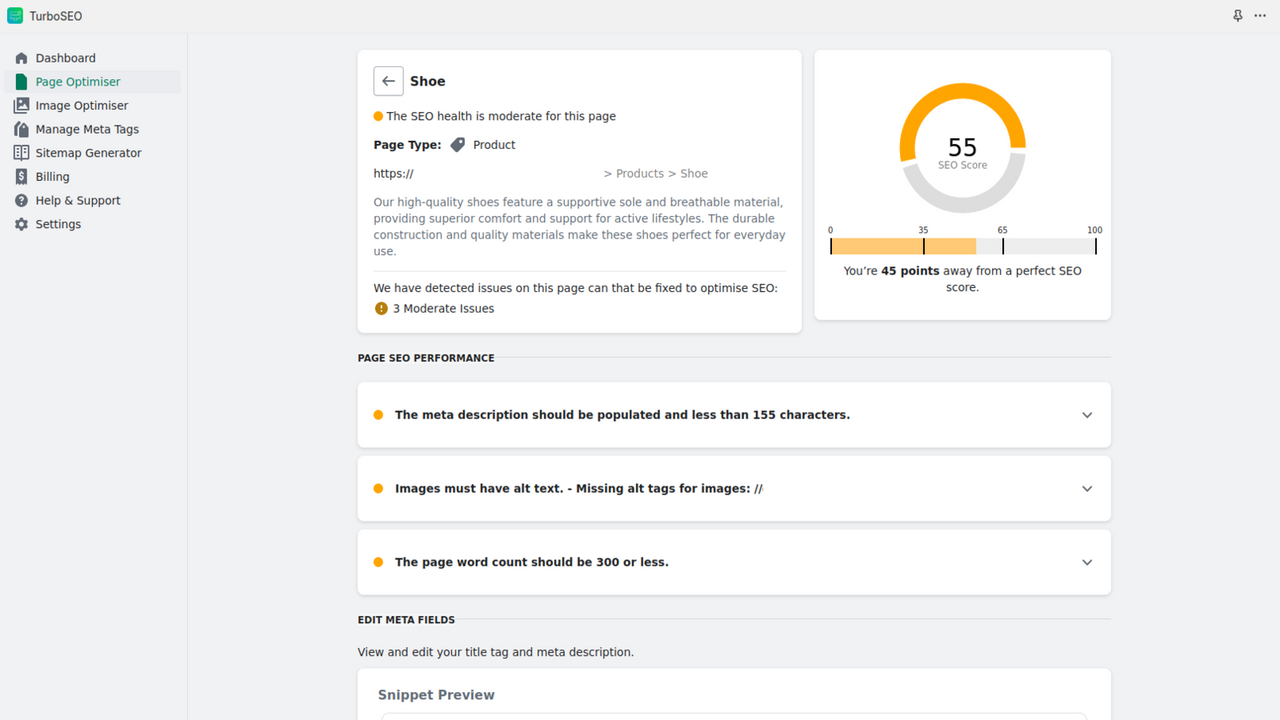
- Keep it under 160 characters.
- Include your primary keyword.
- Make it compelling to encourage clicks.
- Use action words like “buy”, “discover”, or “learn”.
For instance, a meta description for an organic coffee product page could be: “Discover the best organic coffee. Buy now and enjoy free shipping!”
Content Strategy
To improve SEO on Shopify, a strong content strategy is essential. High-quality content attracts visitors and helps with search engine rankings. Updating old content keeps your site fresh and relevant.
Creating High-quality Content
High-quality content keeps visitors engaged. It also improves your rankings. Here are some tips for creating great content:
- Understand Your Audience: Know what your audience wants.
- Use Keywords: Include relevant keywords naturally in your content.
- Write Engaging Titles: Titles should be catchy and include your main keyword.
- Provide Value: Answer questions and solve problems.
- Use Visuals: Add images and videos to make your content more engaging.
Creating high-quality content can boost your site’s visibility. Make sure every piece adds value to your audience.
Updating Old Content
Updating old content is crucial for maintaining SEO rankings. Here are steps to update old content effectively:
- Identify Underperforming Content: Use tools like Google Analytics to find content that needs updating.
- Refresh Information: Update outdated information with the latest data.
- Improve Readability: Break up long paragraphs, use bullet points, and add subheadings.
- Add New Keywords: Research new relevant keywords and integrate them into your content.
- Update Visuals: Replace old images and videos with high-quality, relevant ones.
Regularly updating your content helps keep your site relevant. It also signals to search engines that your site is active.
Url Structure
The URL structure on your Shopify store plays a crucial role in your SEO success. A clean, optimized URL can significantly enhance your site’s visibility on search engines. Let’s explore how you can improve your Shopify SEO by focusing on URL structure.
Creating Seo-friendly Urls
An SEO-friendly URL is short, descriptive, and easy to read. Use relevant keywords in your URLs. For example, use /summer-dresses instead of /product123. Always use hyphens to separate words. Avoid using underscores or spaces. Here is an example of a good URL structure:
/collections/summer-dresses/products/blue-summer-dress
Keep URLs consistent across your site. This helps search engines understand your content better. Also, make sure to avoid unnecessary words in your URLs.
Avoiding Duplicate Urls
Duplicate URLs can confuse search engines and harm your SEO. Shopify sometimes creates duplicate URLs due to product variants. To avoid this, ensure each product has a unique URL. Use canonical tags to indicate the primary URL for each page. This tells search engines which URL to index.
Here’s how to add a canonical tag in Shopify:
Check for duplicate URLs regularly. Use tools like Google Search Console to identify and fix issues. Also, avoid using session IDs in your URLs as they can create duplicates.
Image Optimization
Image optimization is essential for improving SEO on Shopify. Properly optimized images can boost your site’s speed and search ranking. Let’s explore how to optimize your images effectively.
Using Alt Text
Alt text describes the content of an image. It helps search engines understand your images.
- Always use descriptive alt text.
- Include relevant keywords naturally.
- Keep it short and to the point.
For example, use 
Compressing Images
Large images slow down your website. Compressing images reduces their file size without losing quality.
Use tools like TinyPNG or ImageOptim to compress your images.
| Tool | Compression Rate |
|---|---|
| TinyPNG | 70% |
| ImageOptim | 60% |
Compressed images load faster. This improves user experience and boosts your SEO.
Mobile Optimization
Mobile optimization is crucial for improving SEO on Shopify. A significant portion of users access websites through mobile devices. Ensuring your Shopify store is mobile-friendly can significantly boost your search engine rankings. Let’s explore how to enhance mobile optimization with a focus on mobile friendliness and page speed.
Ensuring Mobile Friendliness
Mobile friendliness is key for a successful Shopify store. Follow these tips to ensure your site is mobile-friendly:
- Use a responsive theme that adapts to different screen sizes.
- Ensure buttons and links are easy to tap.
- Use large fonts for easy readability on small screens.
- Implement a simple and intuitive navigation menu.
| Action | Description |
|---|---|
| Responsive Theme | Choose a theme that adjusts to any screen size. |
| Tap-Friendly Elements | Make buttons and links easy to tap with a finger. |
| Large Fonts | Use large fonts for better readability on mobile devices. |
| Simple Navigation | Ensure your navigation menu is easy to use. |
Improving Page Speed
Page speed is crucial for mobile optimization. A fast-loading site enhances user experience and improves SEO. Here are some strategies to boost your Shopify store’s page speed:
- Optimize images by compressing them without losing quality.
- Use a content delivery network (CDN) to speed up content delivery.
- Minimize the use of large JavaScript and CSS files.
- Leverage browser caching to store static files.
- Remove unnecessary apps and plugins that slow down your site.
By focusing on mobile optimization, you can improve your Shopify store’s SEO. This leads to higher search engine rankings and more traffic.
Link Building
Link Building is crucial for improving SEO on Shopify. It enhances your store’s visibility and authority. Below are strategies to help you build effective links.
Acquiring Backlinks
Backlinks from reputable sites boost your Shopify store’s credibility. They signal search engines about your site’s value.
- Guest Blogging: Write posts for popular blogs in your niche. Include a link back to your store.
- Influencer Outreach: Collaborate with influencers to get mentions and links.
- Content Marketing: Create valuable content that others want to link to.
Use tools like Ahrefs to find backlink opportunities. Analyze your competitors’ backlinks for ideas.
Internal Linking Strategies
Internal links connect different pages within your store. They help distribute page authority and improve user navigation.
Anchor Text: Use descriptive, relevant keywords for internal links. This helps search engines understand the linked page’s content.
- Link to Key Pages: Ensure important pages like product pages have more internal links.
- Content Hubs: Create clusters of related content. Link them to a central hub page.
Regularly audit your internal links. Ensure no broken links exist and optimize for user experience.
Here’s a simple table for quick reference:
| Strategy | Description |
|---|---|
| Guest Blogging | Write posts for other blogs and link back to your store |
| Influencer Outreach | Partner with influencers to gain mentions and links |
| Content Marketing | Create valuable content that others want to link to |
| Anchor Text | Use descriptive keywords for internal links |
| Link to Key Pages | Give more links to important pages |
| Content Hubs | Create clusters of related content linked to a central hub |
User Experience
Enhancing the user experience on your Shopify store can significantly improve your SEO. A great user experience leads to higher engagement, more conversions, and better search engine rankings. Focus on optimizing site navigation and reducing bounce rates to ensure a smooth and engaging experience for your visitors.
Improving Site Navigation
A well-structured navigation menu helps users find what they need quickly. Keep your menu simple and organized. Use clear and concise labels for each category. Avoid cluttering the menu with too many options.
- Use a logical hierarchy for categories and subcategories.
- Include a search bar for easy access to products.
- Ensure all important pages are accessible within three clicks.
Proper navigation not only improves user experience but also helps search engines crawl and index your site efficiently.
Reducing Bounce Rate
A high bounce rate indicates that users leave your site quickly. To reduce bounce rate, make sure your content is engaging and relevant. Fast loading pages are crucial. Slow pages drive users away.
- Optimize images and use compressed formats.
- Leverage browser caching to speed up page load times.
- Ensure your site is mobile-friendly and responsive.
Using engaging visuals and clear calls-to-action can keep users on your site longer. Consider using videos, infographics, and interactive elements to make your content more appealing.
| Factor | Impact |
|---|---|
| Fast Loading Pages | Reduces bounce rate |
| Mobile-Friendly Design | Improves user retention |
| Engaging Content | Keeps users on site |
By focusing on user experience, you can create a more enjoyable shopping experience. This will improve your SEO on Shopify and lead to better overall performance.
Technical Seo
Technical SEO is the backbone of any successful Shopify store. It involves optimizing your site’s infrastructure. This ensures search engines can crawl and index your site effectively. By addressing technical SEO, you enhance your site’s performance and user experience. Let’s dive into some critical aspects of technical SEO.
Implementing Schema Markup
Schema markup is a form of microdata. It helps search engines understand your site content better. Adding schema markup can improve your visibility in search results. It also enhances rich snippets, which can lead to higher click-through rates.
Here’s a simple example of product schema markup:
Including schema markup can boost your SEO efforts. It provides more context to search engines. Use Google’s Structured Data Testing Tool to validate your markup.
Fixing Broken Links
Broken links can harm your SEO and user experience. They lead to 404 errors, which search engines dislike. Regularly check your site for broken links and fix them promptly.
Here’s a simple method to find and fix broken links:
- Use tools like Screaming Frog or Ahrefs to crawl your site.
- Identify broken links in the report.
- Update or redirect these links to relevant pages.
Fixing broken links ensures a seamless user experience. It also helps maintain your site’s authority. Both users and search engines appreciate a well-maintained site.
Analytics And Tracking
Understanding analytics and tracking is crucial for improving SEO on Shopify. By monitoring your site’s performance, you can make data-driven decisions. These insights help optimize your store for better visibility and higher rankings.
Setting Up Google Analytics
Google Analytics is a powerful tool for tracking website performance. Follow these steps to set it up on your Shopify store:
- Create a Google Analytics account.
- Get your tracking ID from Google Analytics.
- Log in to your Shopify admin panel.
- Navigate to Online Store > Preferences.
- Paste your tracking ID in the Google Analytics account field.
- Click Save to apply the changes.
Google Analytics is now tracking your Shopify store. This data helps you understand visitor behavior and optimize accordingly.
Monitoring Seo Performance
Regularly monitoring your SEO performance is essential. Here are some key metrics to track:
- Organic Traffic: The number of visitors from search engines.
- Bounce Rate: The percentage of visitors who leave after viewing one page.
- Average Session Duration: How long visitors stay on your site.
- Pages per Session: The average number of pages viewed per visit.
- Conversion Rate: The percentage of visitors who make a purchase.
Use these metrics to identify areas for improvement. For instance, a high bounce rate may indicate poor user experience. Improving page load speed and content relevance can help reduce it.
| Metric | Description |
|---|---|
| Organic Traffic | Visitors from search engines. |
| Bounce Rate | Percentage of single-page visits. |
| Average Session Duration | Time spent on your site. |
| Pages per Session | Average pages viewed per visit. |
| Conversion Rate | Percentage of visitors who buy something. |
Regularly review these metrics in Google Analytics. This helps you stay informed about your Shopify store’s SEO performance and make necessary adjustments.

Frequently Asked Questions
How Do I Improve My Seo Score On Shopify?
Optimize your Shopify store by using relevant keywords, improving site speed, creating quality content, and building backlinks. Use SEO-friendly URLs and meta tags.
Is Seo Difficult In Shopify?
SEO in Shopify can be challenging but manageable. Shopify offers various built-in SEO tools. Optimize product pages, blogs, and meta tags for better results.
Can I Do Seo With Shopify?
Yes, you can do SEO with Shopify. It offers built-in SEO features and supports various SEO apps for optimization.
What Is The Best Seo Tool For Shopify?
The best SEO tool for Shopify is “SEMrush. ” It offers keyword research, site audits, and competitor analysis, enhancing your store’s visibility.
How To Optimize Shopify Product Pages?
Use unique titles, meta descriptions, and high-quality images. Add relevant keywords naturally in product descriptions.
Conclusion
Boosting your Shopify SEO is essential for attracting more customers. Follow the strategies discussed to improve search rankings. Consistent effort and optimization will yield better results. Stay updated with SEO trends and monitor your progress. Implement these tips to see a significant impact on your online store’s visibility and sales.

