

Technical SEO in digital marketing involves optimizing a website’s infrastructure for search engines. It focuses on improving crawling, indexing, and website speed.
Technical SEO is crucial for enhancing website performance. Search engines need to crawl and index your site efficiently to rank it higher. Optimizing elements like site speed, mobile compatibility, and structured data can significantly impact search engine results. Proper URL structure, XML sitemaps, and secure connections (HTTPS) are also essential.
These optimizations ensure a better user experience, leading to increased organic traffic. Investing in technical SEO helps search engines understand your site better, making it easier to achieve higher rankings and visibility.

Introduction To Technical Seo
Technical SEO is a key part of digital marketing. It focuses on optimizing the backend of a website. This helps search engines crawl and index your site more effectively. Proper technical SEO improves your site’s visibility and performance.
Basics Of Technical Seo
The basics of technical SEO are essential for any digital marketer. It includes optimizing your website’s structure. This ensures search engines can easily crawl your site. Important elements include:
- Site Speed: Fast loading pages improve user experience.
- Mobile-Friendliness: Make sure your site works well on mobile devices.
- Secure Sockets Layer (SSL): SSL certificates enhance site security.
- XML Sitemaps: These help search engines understand your site structure.
- Robots.txt: This file guides search engines on which pages to crawl.
Importance In Digital Marketing
Technical SEO is crucial in digital marketing. It ensures your site is accessible and easy to navigate. Search engines prioritize well-optimized sites. This means better rankings and more traffic. Here are some key reasons why technical SEO is important:
- Better Crawlability: Search engines can easily find and index your pages.
- Improved User Experience: Fast, secure, and mobile-friendly sites attract more visitors.
- Higher Search Rankings: Optimized sites rank higher in search results.
- Increased Traffic: Higher rankings lead to more organic traffic.
- Enhanced Security: SSL certificates protect your site and build trust with users.
| Technical SEO Element | Importance |
|---|---|
| Site Speed | Improves user experience |
| Mobile-Friendliness | Attracts mobile users |
| SSL Certificates | Enhances security |
| XML Sitemaps | Assists search engines |
| Robots.txt | Directs search engines |
Key Elements Of Technical Seo
Technical SEO is crucial for improving your website’s performance and visibility. By focusing on key elements of technical SEO, you can ensure your site is optimized for search engines and users. Here, we delve into two important aspects: site speed and mobile-friendliness.
Site Speed
Site speed is a critical factor for both user experience and SEO. A fast-loading site keeps visitors engaged and reduces bounce rates. Here are some ways to improve your site’s speed:
- Optimize Images: Use compressed formats like JPEG or PNG.
- Minimize HTTP Requests: Reduce the number of elements on your page.
- Enable Browser Caching: Store static files to load pages faster.
- Use a Content Delivery Network (CDN): Distribute content across various servers.
Mobile-friendliness
Mobile-friendliness is essential since more users browse on mobile devices. Google also prioritizes mobile-friendly sites in its rankings. To ensure your site is mobile-friendly, focus on the following:
- Responsive Design: Your site should adapt to different screen sizes.
- Fast Mobile Load Times: Optimize for speed on mobile networks.
- Easy Navigation: Ensure menus and buttons are user-friendly.
- Touchscreen Readiness: Make sure elements are easy to tap.
By focusing on these key elements of technical SEO, you can improve your site’s performance and search engine rankings.
Crawling And Indexing
In the realm of digital marketing, Technical SEO is crucial. It ensures your website is optimized for search engines. Two critical aspects of Technical SEO are Crawling and Indexing. Understanding these processes helps your site rank better in search results.
Understanding Crawlers
Crawlers are also known as spiders or bots. They are programs that search engines use to explore the web. Crawlers visit web pages, read content, and follow links. This process helps search engines understand your site’s structure and content.
Ensuring your site is easily crawlable is vital. Here are some tips:
- Use a robots.txt file to guide crawlers.
- Create a XML sitemap for better navigation.
- Avoid duplicate content to prevent confusion.
- Ensure your site’s loading speed is optimal.
Ensuring Proper Indexing
Indexing is the process where search engines store and organize content. Once crawlers gather information, it gets indexed. Proper indexing ensures your content appears in search results.
To ensure proper indexing:
- Check your site’s index status using tools like Google Search Console.
- Use meta tags to guide search engines.
- Regularly update your content for freshness.
- Ensure your site is mobile-friendly.
Here’s a quick comparison of Crawling vs Indexing:
| Aspect | Crawling | Indexing |
|---|---|---|
| Definition | Exploring web pages | Storing and organizing content |
| Tool | Robots.txt | Meta tags |
| Purpose | Understanding structure | Appearing in search results |
Site Architecture
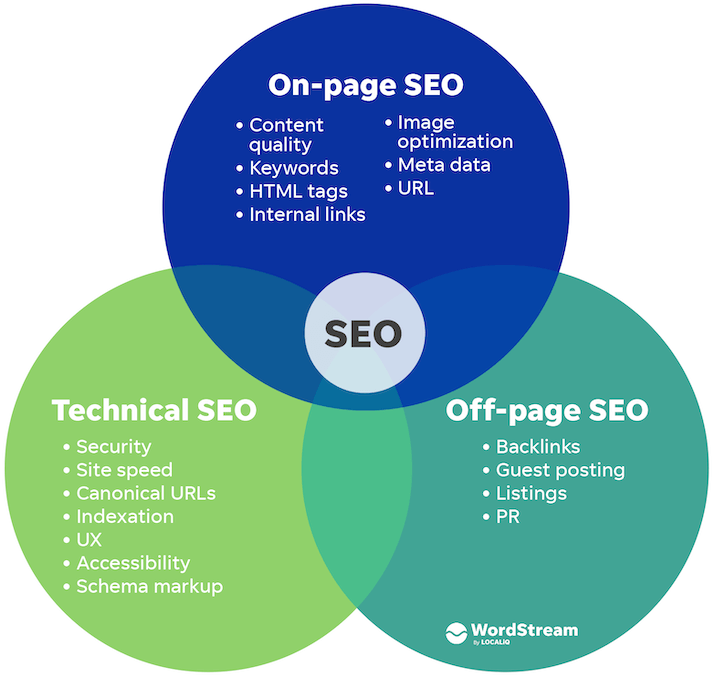
Site Architecture is a critical component of Technical SEO in digital marketing. A well-structured site ensures search engines can easily crawl and index your content. It also provides a better user experience. This section will cover key aspects of site architecture, focusing on Logical Structure and Internal Linking.
Logical Structure
A logical structure is like a roadmap for your website. It helps search engines understand the relationship between different pages. A clear structure improves your site’s crawlability and indexability.
Here’s how to achieve a logical structure:
- Hierarchical Organization: Arrange your pages in a hierarchy. For example, your homepage at the top, followed by category pages, and then individual pages.
- URL Structure: Use simple, descriptive URLs. This makes it easier for search engines to understand your content.
- Sitemap: Create an XML sitemap. Submit it to search engines. This helps them find all your pages.
Internal Linking
Internal linking connects different pages of your website. It distributes page authority and helps users navigate.
Effective internal linking involves:
- Anchor Text: Use descriptive anchor text for your links. This helps search engines understand the linked page’s content.
- Link Depth: Ensure important pages are no more than three clicks away from the homepage. This improves accessibility.
- Link Relevance: Link related content. This enhances user experience and keeps visitors on your site longer.
Below is a simple example of internal linking:
SEO TipsUse these strategies to enhance your site architecture. It will boost your SEO performance.
Url Structure
Understanding URL Structure is crucial in Technical SEO for digital marketing. A well-structured URL improves search engine ranking and user experience. Let’s dive into best practices and common mistakes.
Best Practices
Follow these best practices to optimize your URL structure:
- Keep URLs short and simple: Short URLs are easy to read and share.
- Use hyphens: Hyphens separate words and improve readability.
- Include keywords: Keywords in URLs help search engines understand your content.
- Use lowercase letters: Lowercase letters avoid confusion and errors.
- Avoid special characters: Special characters can cause issues with URL encoding.
- Use descriptive words: Descriptive words tell users what to expect on the page.
Common Mistakes
Avoid these common mistakes to prevent SEO issues:
- Using long URLs: Long URLs are difficult to read and remember.
- Ignoring keywords: Missing keywords can lower your search engine ranking.
- Using underscores: Underscores are hard to see and separate words poorly.
- Using uppercase letters: Uppercase letters can lead to duplicate content issues.
- Adding unnecessary parameters: Unnecessary parameters can confuse search engines.
- Using special characters: Special characters can break links and cause errors.
For a quick reference, here’s a table of best practices and common mistakes:
| Best Practices | Common Mistakes |
|---|---|
| Keep URLs short and simple | Using long URLs |
| Use hyphens | Using underscores |
| Include keywords | Ignoring keywords |
| Use lowercase letters | Using uppercase letters |
| Avoid special characters | Using special characters |
| Use descriptive words | Adding unnecessary parameters |
Optimizing your URL structure helps search engines and users. Implement these tips to improve your site’s performance.
On-page Technical Factors
On-page technical factors are crucial for your website’s SEO. They help search engines understand your content. These factors can significantly improve your site’s ranking.
Meta Tags
Meta tags are snippets of text. They describe the content of a page. These tags do not appear on the page itself. They are in the page’s code. Search engines use meta tags to understand the page.
The two most important meta tags are:
- Title Tag: Shows the title of the page. It appears in search engine results.
- Meta Description: Summarizes the page. It also appears in search results.
Ensure your title tag is 50-60 characters long. Keep your meta description under 160 characters. Use keywords in both tags. This helps in better ranking.
Header Tags
Header tags are used to structure your content. They range from
to
. The
tag is the most important. It represents the main topic of the page.
Use header tags to break your content into sections. This makes it easier to read. Search engines also use these tags to understand the content structure.
Best practices for header tags include:
- Use only one
tag per page. - Include keywords in your header tags.
- Use
and
tags for subheadings.
Proper use of header tags can improve your site’s SEO. It makes your content more accessible.
Structured Data
Structured data is a standardized format to classify and tag the information. It helps search engines understand the content on your website. Using structured data improves your site’s visibility and ranking.
Schema Markup
Schema markup is a form of structured data used to highlight elements. It uses a unique vocabulary that search engines understand. This code helps search engines return more informative results for users.
Here’s an example of schema markup for a recipe:
{
  "@context": "https://schema.org/",
  "@type": "Recipe",
  "name": "Chocolate Cake",
  "author": {
    "@type": "Person",
    "name": "John Doe"
  },
  "datePublished": "2023-10-01",
  "description": "A delicious chocolate cake recipe.",
  "recipeIngredient": [
    "1 cup sugar",
    "2 eggs",
    "1/2 cup butter"
  ],
  "recipeInstructions": [
    "Preheat oven to 350 degrees F.",
    "Mix all ingredients together.",
    "Bake for 30 minutes."
  ]
}
Rich Snippets
Rich snippets are search results with extra information. They display details like reviews, ratings, and images. Rich snippets draw more attention and clicks.
Rich snippets are created using structured data. Here are types of rich snippets:
- Product: Shows price, availability, and ratings.
- Recipe: Displays cooking time, ingredients, and reviews.
- Event: Lists date, location, and ticket availability.
Adding schema markup to your site can create rich snippets. This makes your site more engaging and informative.
Technical Seo Tools
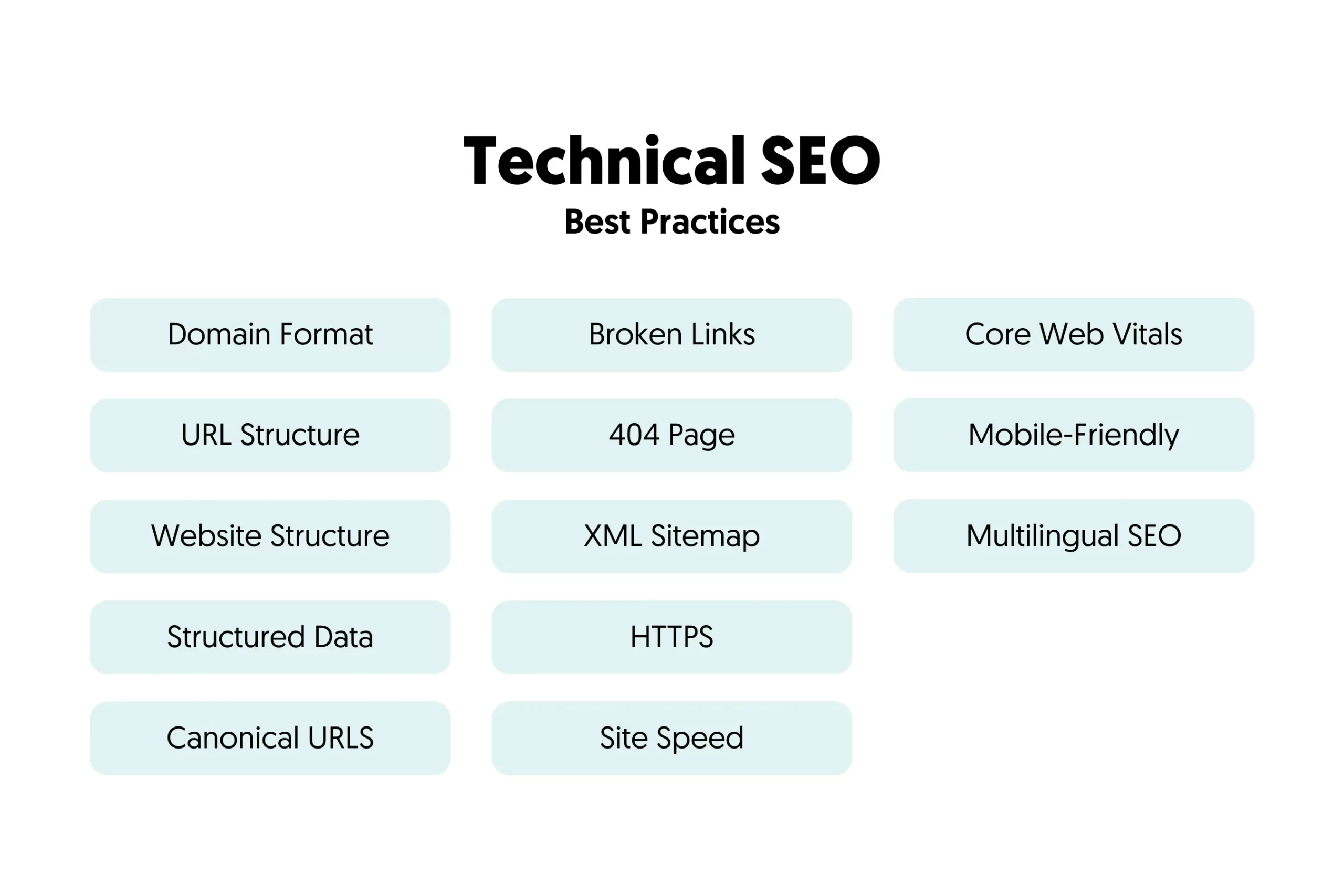
Technical SEO tools are essential for optimizing your website’s technical aspects. They help ensure your site is search engine friendly. Using these tools can improve your site’s visibility and performance.
Popular Tools
There are many technical SEO tools available. Here are some of the most popular ones:
- Google Search Console
- Ahrefs
- Screaming Frog
- SEMrush
- GTmetrix
How To Use Them
Each tool has its own unique features. Here is a simple guide on how to use them:
| Tool | How to Use |
|---|---|
| Google Search Console | Track site performance, fix issues, and get search insights. |
| Ahrefs | Analyze backlinks, research keywords, and track rankings. |
| Screaming Frog | Crawl your website for broken links, duplicate content, and more. |
| SEMrush | Audit your site, track rankings, and conduct keyword research. |
| GTmetrix | Measure your site’s speed and get recommendations for improvement. |
These tools offer a wealth of data. Use this data to improve your site’s technical aspects. Better technical SEO leads to higher rankings and more traffic.
Technical Seo Audits
Technical SEO audits are vital for improving your website’s performance. They help identify issues that may hinder your site’s visibility in search engines. These audits focus on the technical aspects of your website. This ensures search engines can crawl and index your site effectively.
Conducting Audits
Conducting a technical SEO audit involves several steps. First, you need to check your website’s crawlability. Use tools like Google Search Console to see how search engines view your site. Next, examine your site’s indexability. Ensure that important pages are indexed by search engines.
You also need to review your site’s site speed. Tools like Google PageSpeed Insights can help with this. A fast website improves user experience and search rankings. Lastly, check for mobile-friendliness. Ensure your site works well on mobile devices.
- Check crawlability
- Examine indexability
- Review site speed
- Ensure mobile-friendliness
Common Issues Found
During a technical SEO audit, you may find several common issues. One common issue is broken links. Broken links can hurt your site’s user experience and SEO. Use tools like Screaming Frog to find and fix broken links.
Another issue is duplicate content. Duplicate content can confuse search engines and lead to lower rankings. Use tools like Copyscape to identify and resolve duplicate content issues. Additionally, you may find missing meta tags. Meta tags help search engines understand your content. Ensure all important pages have relevant meta tags.
| Issue | Description | Tool |
|---|---|---|
| Broken Links | Links that no longer work | Screaming Frog |
| Duplicate Content | Same content on multiple pages | Copyscape |
| Missing Meta Tags | Lack of meta descriptions | Various SEO Tools |
Addressing these common issues can significantly improve your website’s performance. Regular technical SEO audits are essential for maintaining a healthy website.
Future Trends In Technical Seo
The world of Technical SEO is ever-evolving. With new technologies and algorithms, staying ahead is crucial. Here, we explore the future trends shaping the landscape of technical SEO. This includes emerging technologies and the importance of staying updated.
Emerging Technologies
New technologies are transforming Technical SEO. Let’s look at some key advancements:
- Artificial Intelligence (AI):
- AI can analyze user behavior.
- It can offer personalized experiences.
- Voice Search Optimization:
- More people use voice search.
- Content must be optimized for natural language queries.
- Mobile-First Indexing:
- Google prioritizes mobile versions of websites.
- Ensure your site is mobile-friendly.
Staying Updated
Keeping up with trends in Technical SEO is essential. Here are some ways to stay updated:
- Follow Industry Blogs:
- Read blogs from SEO experts.
- Get insights on the latest updates.
- Attend Webinars and Conferences:
- Learn from industry leaders.
- Network with other professionals.
- Subscribe to Newsletters:
- Receive regular updates on SEO trends.
- Stay informed about algorithm changes.
In the table below, we summarize the key trends and their impact:
| Trend | Impact |
|---|---|
| Artificial Intelligence | Enhanced user experience |
| Voice Search Optimization | Improved search visibility |
| Mobile-First Indexing | Higher mobile search rankings |
Frequently Asked Questions
What Is Technical Seo With An Example?
Technical SEO involves optimizing website infrastructure for search engines. For example, improving site speed can enhance search rankings.
What Is Technical Page Seo In Digital Marketing?
Technical page SEO involves optimizing a website’s backend to improve search engine rankings. It includes site speed, mobile-friendliness, and secure connections.
What Is The Difference Between Technical Seo And Seo?
Technical SEO focuses on optimizing the website’s backend, like speed and structure. SEO includes all strategies to improve search rankings.
What Is The Difference Between Technical Seo And Content Seo?
Technical SEO focuses on website structure and performance. Content SEO optimizes the quality and relevance of website content.
What Is Technical Seo?
Technical SEO refers to optimizing a website’s infrastructure for search engine crawling and indexing.
Conclusion
Mastering technical SEO is crucial for digital marketing success. It improves website performance, visibility, and user experience. Implement these strategies to stay ahead in search rankings. Consistent efforts in technical SEO ensure long-term growth and better online presence. Stay updated with the latest trends and techniques for optimal results.

