

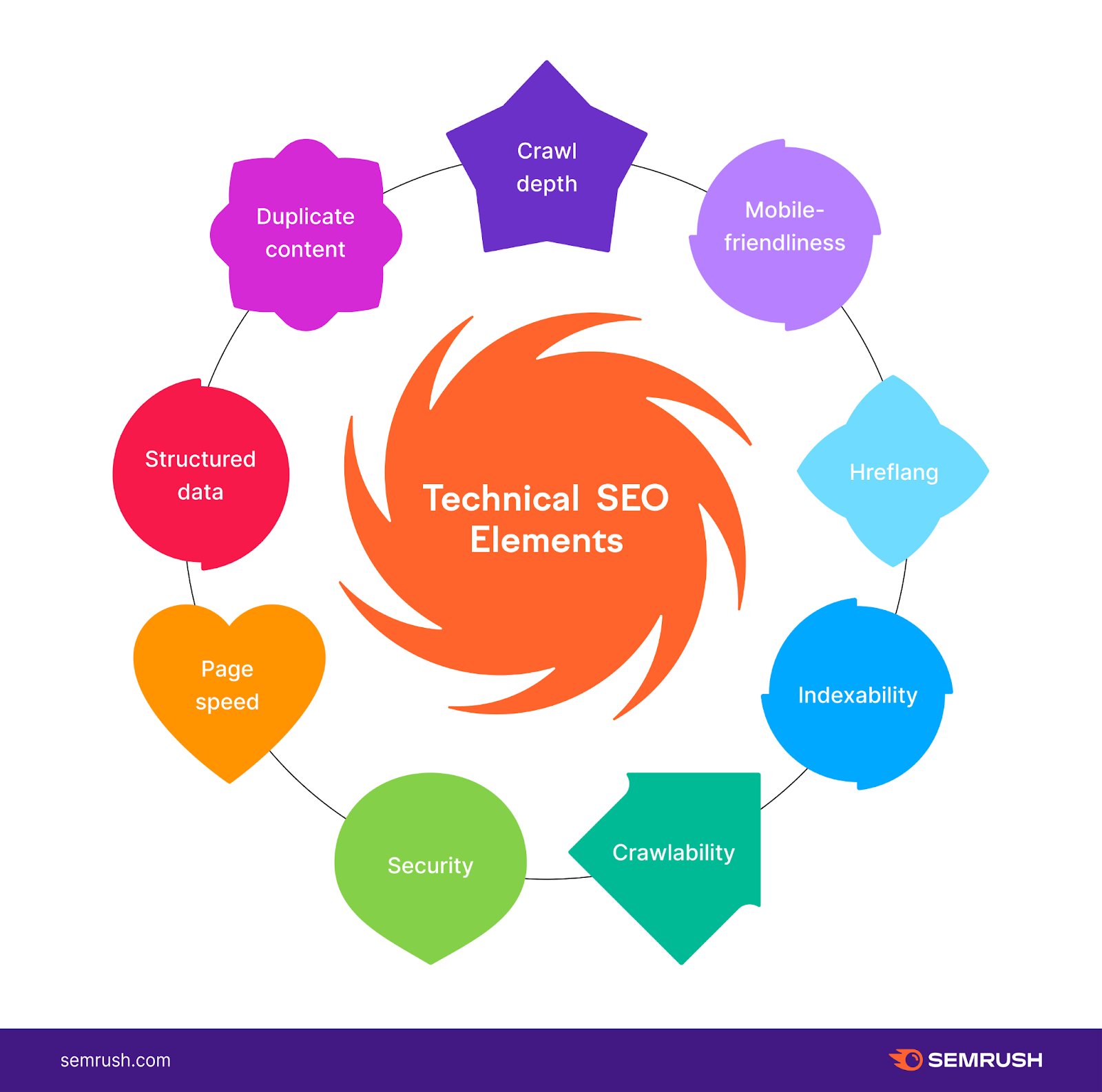
Elements of Technical SEO include website speed, mobile-friendliness, and secure connections. These aspects help improve search engine rankings.
Technical SEO ensures that your website meets the technical requirements of search engines. It focuses on improving website speed, mobile-friendliness, and secure connections to enhance user experience. A well-optimized site can lead to better search engine rankings and increased organic traffic.
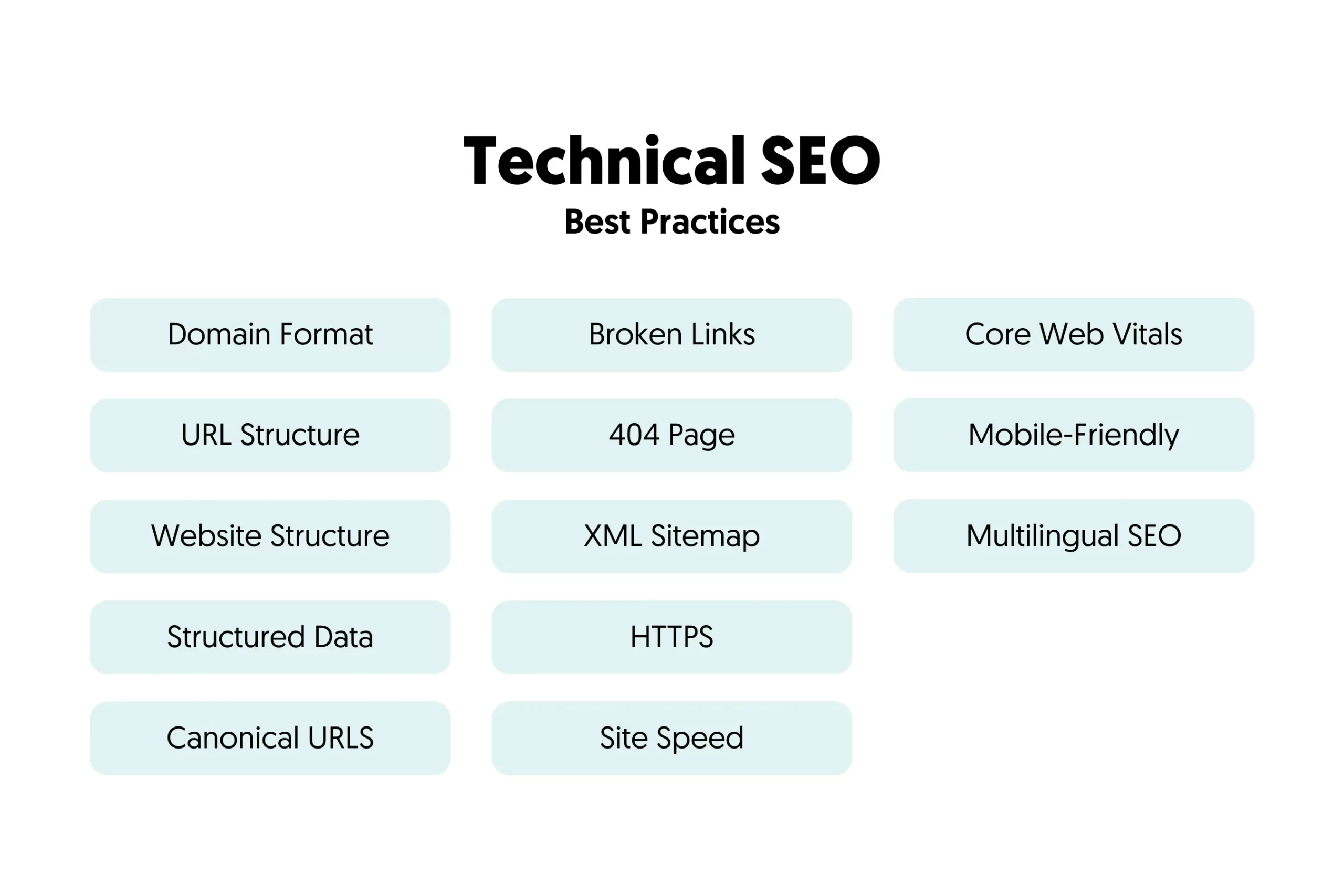
Other critical elements include proper URL structures, XML sitemaps, and structured data. An effective technical SEO strategy can make your site more accessible to search engine crawlers, boosting visibility. By addressing these elements, you can create a solid foundation for your overall SEO efforts. This ensures your website performs optimally, providing users with a seamless experience.
Introduction To Technical Seo
Technical SEO is the backbone of a website. It ensures your site is readable by search engines. Without it, your content may not rank well. This guide will break down its importance and impact on website performance.
Importance Of Technical Seo
Technical SEO helps search engines find your website. It involves optimizing the backend structure of your site. This includes improving site speed, mobile-friendliness, and ensuring a secure connection. Here are some key points:
- Site Speed: Faster sites rank better.
- Mobile-Friendliness: Google prioritizes mobile-friendly sites.
- Security: HTTPS sites get a ranking boost.
Impact On Website Performance
Technical SEO directly affects your website’s performance. A well-optimized site loads faster. This leads to better user experience. Users stay longer, reducing bounce rates. This, in turn, boosts your search engine rankings.
Here is a summary of the impact:
| Element | Impact |
|---|---|
| Site Speed | Better user experience |
| Mobile-Friendliness | Higher mobile rankings |
| Security (HTTPS) | Improved trust and rankings |
Website Crawling
Website crawling is the process where search engines discover new content on your site. They use bots, also known as crawlers or spiders, to find and index web pages. Effective crawling is vital for SEO success. Search engines can’t rank pages they don’t know exist.
Crawlability Factors
Several factors affect a website’s crawlability. These factors determine how easily search engines can access your content.
- Robots.txt File: This file guides search engine bots on which pages to crawl.
- XML Sitemaps: These sitemaps help bots find all important pages on your site.
- Internal Linking: Proper internal links ensure bots can navigate your site.
- Site Structure: A well-organized structure improves crawlability.
- Page Load Speed: Faster pages are easier for bots to crawl.
Improving Crawl Efficiency
Improving crawl efficiency ensures that search engines can index your pages quickly.
- Optimize Robots.txt: Ensure your
robots.txtfile is correctly configured. - Update XML Sitemaps: Keep your sitemaps updated with new content.
- Fix Broken Links: Resolve any broken links that hinder crawling.
- Use Canonical Tags: Avoid duplicate content issues with canonical tags.
- Monitor Crawl Errors: Regularly check for and fix crawl errors in Google Search Console.
By focusing on these elements of technical SEO, you can enhance your website’s visibility. Effective crawling is the first step to better search engine rankings.
Indexing Strategies
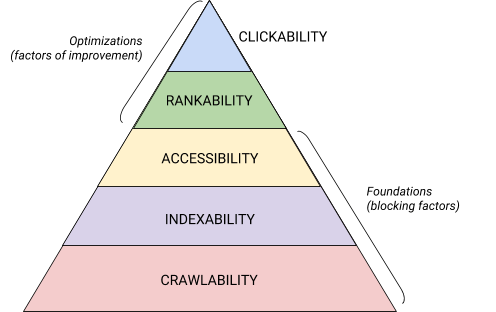
Technical SEO is crucial for improving your website’s visibility on search engines. One key aspect of technical SEO is Indexing Strategies. Proper indexing ensures that search engines can find and rank your web pages. This section will cover essential indexing strategies, focusing on optimizing indexability and handling duplicate content.
Optimizing Indexability
Search engines use bots to crawl and index web pages. Optimizing indexability means making it easy for these bots to understand and index your content. Here are some tips to help you:
- Submit a Sitemap: A sitemap helps search engines find and index all your pages.
- Use Robots.txt: This file tells search engines which pages to crawl and which to ignore.
- Ensure Clean URLs: Clean URLs are easier for search engines to read and index.
By following these steps, you can improve your site’s indexability. This helps search engines rank your pages better.
Handling Duplicate Content
Duplicate content confuses search engines and can hurt your rankings. Here are ways to handle duplicate content:
| Strategy | Explanation |
|---|---|
| Canonical Tags | Use canonical tags to tell search engines your preferred version of a page. |
| 301 Redirects | Redirect duplicate pages to the main page using 301 redirects. |
| Unique Content | Always aim to create unique content for each page. |
Using these strategies, you can avoid duplicate content issues. This ensures search engines understand and properly index your site.
Url Structure
The URL structure of your website plays a crucial role in technical SEO. A well-structured URL helps search engines crawl your site more efficiently. It also improves user experience by making URLs readable and memorable.
Best Practices For Urls
Follow these best practices to create effective URLs:
- Use descriptive keywords in your URLs.
- Keep URLs short and simple.
- Use hyphens to separate words.
- Avoid using special characters.
- Ensure URLs are in lowercase.
- Use HTTPS for secure connections.
These practices make URLs more user-friendly and help search engines understand your content.
Canonicalization
Canonicalization is vital for avoiding duplicate content issues. It tells search engines which version of a URL is the original.
Use the tag in your HTML to specify the canonical URL.
| Scenario | Action |
|---|---|
| Duplicate URLs | Implement canonical tags |
| Dynamic URLs | Use canonical tags |
Proper canonicalization helps consolidate link equity and improves search engine rankings.
Mobile Optimization
Mobile optimization is crucial for technical SEO. It ensures your site looks great and works well on mobile devices. With more users accessing sites via mobile, optimizing for mobile is essential.
Responsive Design
Responsive design adjusts your website’s layout based on the screen size. This ensures users have the best experience, whether on a desktop, tablet, or smartphone.
- Improves user experience
- Reduces bounce rates
- Boosts engagement
Use flexible grids and images. CSS media queries help design for different devices.
Mobile-first Indexing
Mobile-first indexing means Google primarily uses the mobile version of your site for ranking and indexing. This shift makes mobile optimization even more important.
| Desktop Version | Mobile Version |
|---|---|
| Less priority in indexing | Primary source for indexing |
| May rank lower | Boosts ranking potential |
Ensure your mobile site contains the same content as the desktop site. Structured data and metadata should also be consistent across both versions.
Site Speed
Site speed is a crucial aspect of technical SEO. A fast-loading website improves user experience and boosts search engine rankings. Let’s dive into why site speed is vital and explore tools to optimize it.
Importance Of Fast Loading Times
Fast loading times enhance user experience. Visitors are more likely to stay on a site that loads quickly. Slow sites can frustrate users, leading to high bounce rates. Search engines, like Google, prioritize fast websites in their rankings.
Here are key reasons why site speed matters:
- Improved User Experience: Users prefer sites that load in under three seconds.
- Higher Rankings: Google uses site speed as a ranking factor.
- Increased Conversions: Fast sites often see higher conversion rates.
- Lower Bounce Rates: Users are less likely to leave a fast-loading site.
Tools For Speed Optimization
Various tools help optimize site speed. These tools analyze your website and provide actionable insights.
Here are some popular tools:
| Tool | Features |
|---|---|
| Google PageSpeed Insights | Analyzes site speed and gives suggestions for improvement. |
| GTmetrix | Provides detailed reports on site performance and ways to enhance speed. |
| Pingdom | Offers in-depth analysis of site speed with recommendations. |
| WebPageTest | Allows testing site speed from multiple locations globally. |
Using these tools can significantly improve your site’s loading times. A faster site offers a better experience for users and can improve your SEO efforts.
Secure Sockets Layer (ssl)
The Secure Sockets Layer (SSL) is a protocol for securing internet connections. It ensures data sent between web servers and browsers remains private. SSL is crucial for protecting sensitive information.
Benefits Of Https
HTTPS, secured by SSL, offers several significant benefits:
- Data Encryption: HTTPS encrypts data, preventing unauthorized access.
- Improved Trust: Users trust websites with HTTPS more.
- Better SEO: Search engines prefer HTTPS sites.
- Protects Data Integrity: It ensures data is not tampered with during transfer.
Implementing Ssl
Follow these steps to implement SSL on your website:
- Purchase an SSL certificate from a trusted provider.
- Install the SSL certificate on your web server.
- Update your website URLs to HTTPS.
- Set up 301 redirects from HTTP to HTTPS.
- Test your website to ensure SSL is working correctly.
Here’s a quick look at some popular SSL certificate providers:
| Provider | Features |
|---|---|
| Comodo | Affordable, widely trusted |
| Symantec | High security, premium pricing |
| Let’s Encrypt | Free, automated, open |
Implementing SSL is crucial for technical SEO. It boosts security, trust, and search engine ranking.
Xml Sitemaps
XML Sitemaps are a crucial element of technical SEO. They help search engines understand your website’s structure. An XML sitemap lists all your site’s pages. This ensures search engines can crawl and index them efficiently.
Creating Effective Sitemaps
An effective XML sitemap includes all important pages. This helps search engines find and index them. Use tools like Google’s XML Sitemaps Generator or Yoast SEO to create your sitemap.
Ensure your sitemap is up-to-date. Whenever you add new content, update the sitemap. This keeps search engines informed about changes on your site.
Here are some tips for creating an effective sitemap:
- Include only canonical versions of URLs.
- Ensure URLs are consistent with your site’s structure.
- Limit the number of URLs to 50,000 per sitemap.
- Use a sitemap index file for large websites.
Submitting To Search Engines
After creating your XML sitemap, submit it to search engines. This ensures your sitemap is recognized and used for crawling.
Follow these steps to submit your sitemap to Google:
- Log in to Google Search Console.
- Go to the Sitemaps section.
- Enter your sitemap URL and click Submit.
For Bing, use the Bing Webmaster Tools:
- Log in to Bing Webmaster Tools.
- Navigate to the Configure My Site section.
- Click on Sitemaps and enter your sitemap URL.
- Click Submit.
Submitting your sitemap helps search engines crawl your site more effectively.
Keep track of your sitemap status in search engine tools. This helps ensure all pages are indexed.
Structured Data
Structured data helps search engines understand your website content better. It provides context to the content, making it easier for search engines to index and display your pages. Using structured data, you can enhance your site’s visibility in search results.
Types Of Structured Data
There are various types of structured data you can use to improve your website’s SEO. Here are some of the most common types:
- Product: Information about a product, including price, availability, and reviews.
- Recipe: Details like ingredients, cooking time, and nutritional information.
- Article: Metadata for news articles, blog posts, and other written content.
- Event: Details about an event, such as date, location, and ticket availability.
- Organization: Information about a company or organization, including contact details and social profiles.
Implementing Schema Markup
Implementing schema markup involves adding a specific code to your website. This code helps search engines understand the context of your content.
Here’s a basic example of schema markup for a recipe:
Make sure to validate your structured data using Google’s Structured Data Testing Tool. This ensures your implementation is correct and helps identify any issues.
Robots.txt File
The Robots.txt file is a crucial element of technical SEO. It tells search engine crawlers which pages to access and which to ignore. By properly configuring this file, you can optimize your site’s crawling efficiency and protect sensitive content.
Configuring Robots.txt
Configuring the Robots.txt file is essential for controlling search engine crawlers. Here’s a step-by-step guide:
- Create a plain text file named
robots.txt. - Place it in the root directory of your website.
- Use the following syntax to allow or disallow crawlers:
User-agent:
Disallow: /private/
Allow: /public/
This example allows all crawlers to access the public directory but blocks access to the private directory.
Common Mistakes To Avoid
Many website owners make mistakes in their Robots.txt configuration. Here are some common pitfalls:
- Blocking essential pages: Ensure you don’t block important pages like your homepage or blog.
- Incorrect syntax: Always double-check your syntax for errors. Even small mistakes can lead to big issues.
- Case sensitivity: Remember that URLs are case-sensitive. Ensure correct capitalization.
| Mistake | Impact |
|---|---|
| Blocking entire site | Search engines can’t index your site |
| Forgetting to update | Outdated rules can mislead crawlers |
| Misconfiguring directives | Important pages may not be crawled |
Technical Seo Tools
Technical SEO tools are essential for optimizing your website’s technical elements. They help you identify issues, monitor performance, and improve site structure. These tools ensure your site is easily crawlable and indexable by search engines, enhancing your overall SEO strategy.
Must-have Seo Tools
Using the right tools can make a big difference. Here are some must-have SEO tools:
- Google Search Console: Monitors your site’s performance in search results.
- Ahrefs: Analyzes backlinks and offers keyword research features.
- SEMrush: Provides insights into your competitors’ SEO strategies.
- Screaming Frog: Crawls your website to identify technical issues.
- GTmetrix: Evaluates your site’s speed and performance.
These tools provide valuable data and insights. They help you make informed decisions and optimize your site effectively.
Using Tools For Seo Audits
Conducting regular SEO audits is crucial. It helps you identify and fix issues. Here’s how to use tools for SEO audits:
- Google Search Console: Check for crawl errors, indexing issues, and security problems.
- Ahrefs: Analyze your backlink profile and identify toxic links.
- Screaming Frog: Crawl your site to find broken links, duplicate content, and missing meta tags.
- GTmetrix: Evaluate your site’s load time and performance metrics.
- SEMrush: Perform a comprehensive site audit to find technical SEO issues.
Use these tools together for a thorough SEO audit. They help you fix problems and improve your site’s performance.
Frequently Asked Questions
What Does Technical Seo Involve?
Technical SEO involves optimizing website speed, mobile-friendliness, site structure, indexing, crawlability, and security to improve search engine rankings.
What Two Elements Make Up The Foundation Of Technical Seo?
The two elements that form the foundation of technical SEO are website structure and page speed. Both are crucial for search engine indexing and user experience.
What Is The Factor In Technical Seo?
Technical SEO factors include site speed, mobile-friendliness, crawlability, secure connections (HTTPS), structured data, and proper URL structure.
What Is Technical Content In Seo?
Technical content in SEO involves optimizing website structure, code, and performance. It enhances search engine crawling, indexing, and user experience.
What Is Technical Seo?
Technical SEO involves optimizing website infrastructure to improve search engine crawling and indexing.
Conclusion
Mastering technical SEO is essential for a successful online presence. Focus on site speed, mobile optimization, and clean code. Regular audits can help identify issues early. Implementing these elements can improve search rankings and user experience. Stay updated with SEO trends to maintain a competitive edge.

