

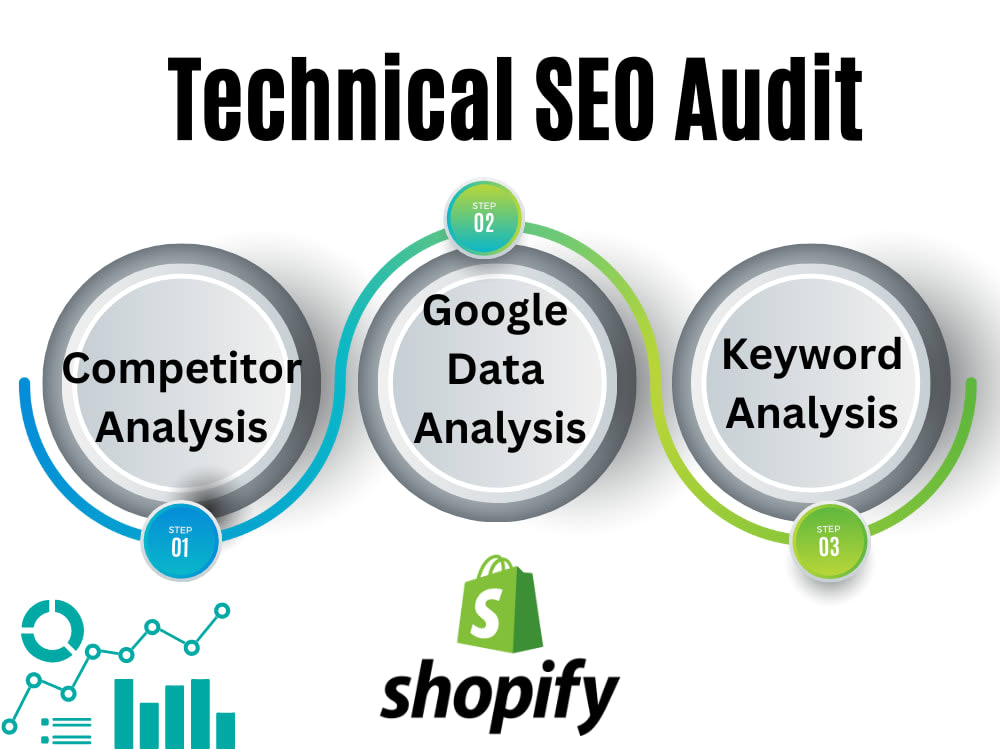
To SEO audit Shopify, analyze site speed, mobile-friendliness, and optimize on-page elements. Identify and fix broken links and ensure proper URL structure.
A comprehensive SEO audit for Shopify ensures your store ranks well in search results, driving more organic traffic. Start by evaluating site speed using tools like Google PageSpeed Insights. Ensure your site is mobile-friendly, as a significant portion of users shop via mobile devices.
Optimize on-page elements, including meta tags, product descriptions, and images, to improve relevance and search visibility. Check for broken links, which can negatively impact user experience and SEO rankings. Finally, ensure your URL structure is clean and descriptive, aiding both search engines and users in understanding your content. These steps will enhance your Shopify store’s performance and visibility.
Introduction To Seo Audits
Conducting an SEO audit is essential for any e-commerce site, including Shopify. It helps identify issues that might be affecting your site’s performance on search engines. Regular audits can boost your site’s visibility, traffic, and sales.
Importance Of Seo
SEO stands for Search Engine Optimization. It involves optimizing your site so that search engines can easily find it. A well-optimized site ranks higher on search engines, attracting more visitors.
- Higher rankings mean more traffic.
- More traffic can lead to increased sales.
- SEO helps build trust and credibility.
Shopify And Seo
Shopify is a popular e-commerce platform. It offers various SEO features to help improve your site’s visibility. Here are some key aspects to consider:
| Aspect | Description |
|---|---|
| Site Structure | Ensure your site has a clear, logical structure. |
| Meta Tags | Optimize meta titles and descriptions for keywords. |
| Alt Text | Add descriptive alt text to images. |
| Page Speed | Improve page loading times for better user experience. |
By focusing on these elements, you can enhance your Shopify store’s SEO performance.
Keyword Research
Conducting a comprehensive SEO audit for your Shopify store is essential for improving search engine rankings. One crucial step in this process is Keyword Research. Effective keyword research helps you understand what potential customers are searching for and optimizes your store to meet those needs.
Identifying Target Keywords
Start by identifying your target keywords. These are the words and phrases that best describe your products and services. Use specific, relevant keywords to attract the right audience.
- Think about what your customers would type into Google.
- Use a mix of short-tail and long-tail keywords.
- Focus on keywords that have a good search volume.
Tools For Keyword Research
Several tools can help you find the best keywords for your Shopify store. These tools provide insights into keyword popularity, competition, and search volume.
| Tool | Features | Price |
|---|---|---|
| Google Keyword Planner | Search volume, keyword suggestions | Free |
| SEMrush | Keyword difficulty, competitor analysis | Paid |
| Ahrefs | Keyword difficulty, backlink analysis | Paid |
Use these tools to gather data and refine your keyword list. Analyzing this data will help you choose the best keywords for your Shopify store.
Remember, effective keyword research is an ongoing process. Regularly update your keyword list to stay ahead of the competition. By focusing on the right keywords, you can attract more targeted traffic and boost your Shopify store’s visibility.
On-page Seo
On-Page SEO is vital for improving your Shopify store’s visibility. It involves optimizing individual pages to rank higher and attract relevant traffic. Focus on elements like meta tags, content quality, and internal linking.
Optimizing Meta Tags
Meta tags are essential for search engines and users. They provide brief information about your page’s content.
| Meta Tag | Purpose | Best Practices |
|---|---|---|
| Title Tag | Page Title | Keep it under 60 characters. Include primary keyword. |
| Meta Description | Page Summary | Keep it under 160 characters. Include primary keyword. |
Ensure each page has unique meta tags. This helps in better indexing and user experience.
Improving Content Quality
Content quality is crucial for On-Page SEO. It impacts user engagement and search rankings.
- Use Relevant Keywords: Include keywords naturally in your content.
- Write Engaging Content: Make your content interesting and easy to read.
- Update Regularly: Keep your content fresh and updated.
Quality content should address user queries. It should be informative and valuable.
Technical Seo
Technical SEO is crucial for ensuring your Shopify store runs smoothly. It involves optimizing the backend of your website. This helps search engines better understand and index your site. Here, we dive into two important aspects: Site Speed Optimization and Mobile-Friendliness.
Site Speed Optimization
Site speed is vital for user experience. A slow site can lead to high bounce rates. To optimize your Shopify site’s speed:
- Compress images: Use tools like TinyPNG to reduce image size without losing quality.
- Leverage browser caching: Store some data in the user’s browser to reduce loading times.
- Minimize HTTP requests: Limit the number of elements on a page.
- Use a Content Delivery Network (CDN): CDNs distribute your site across multiple servers, reducing load times.
Here’s a quick comparison table to illustrate the benefits:
| Optimization Technique | Benefit |
|---|---|
| Compress images | Faster load times |
| Leverage browser caching | Reduced server load |
| Minimize HTTP requests | Improved site speed |
| Use a CDN | Better global reach |
Mobile-friendliness
Most users browse on mobile devices. Ensure your Shopify store is mobile-friendly. Here are some tips:
- Responsive design: Use themes that adapt to different screen sizes.
- Touch-friendly navigation: Make sure buttons and links are easy to tap.
- Optimize images for mobile: Use smaller images for faster loading on mobile devices.
- Test on multiple devices: Check how your site looks on various mobile devices.
Follow these guidelines to make your Shopify store technically sound. A well-optimized site will rank higher and offer a better user experience.
Url Structure
The URL Structure of your Shopify store can significantly impact your SEO performance. A well-structured URL helps search engines understand your site’s content. It also makes it easier for users to navigate.
Best Practices
Follow these best practices to optimize your Shopify URL structure:
- Keep URLs Short: Short URLs are easier to read and share.
- Use Keywords: Include relevant keywords in your URLs.
- Hyphens Over Underscores: Use hyphens to separate words.
- Avoid Special Characters: Stick to alphanumeric characters and hyphens.
- Consistency is Key: Maintain a uniform structure for all URLs.
Avoiding Common Mistakes
Here are common mistakes to avoid in your Shopify URL structure:
- Dynamic URLs: Avoid URLs with parameters and session IDs.
- Capital Letters: URLs should be in lowercase to prevent duplication.
- Keyword Stuffing: Do not overload URLs with keywords.
- Redundant Words: Remove unnecessary words from URLs.
- Long URLs: Avoid overly long URLs that are hard to read.
Consider the following table that summarizes these points:
| Best Practices | Common Mistakes |
|---|---|
| Keep URLs Short | Dynamic URLs |
| Use Keywords | Capital Letters |
| Hyphens Over Underscores | Keyword Stuffing |
| Avoid Special Characters | Redundant Words |
| Consistency is Key | Long URLs |
By following these guidelines, you can create a clean, SEO-friendly URL structure for your Shopify store. This will improve your site’s visibility and user experience.
Internal Linking
Internal linking is a crucial part of SEO. It helps users navigate your Shopify store. Internal links also spread link equity across your site. This boosts your search engine rankings.
Importance Of Internal Links
Internal links connect different pages on your Shopify store. They improve user experience by guiding visitors to related content. They also help search engines understand your site’s structure.
Search engines use internal links to discover new pages. This helps your new products get indexed faster. Internal links can also distribute page authority. This makes your entire site more powerful in search results.
Creating A Link Strategy
A solid link strategy is essential. Start by identifying your most important pages. These are your product pages, category pages, and blog posts.
- Link from high-authority pages to new or less authoritative pages.
- Ensure every important page is linked to from somewhere else on your site.
- Use relevant anchor text for your links. This helps users and search engines understand the context.
Use a mix of navigational links and contextual links. Navigational links include your main menu and footer links. Contextual links are found within your content. They provide extra value by linking to related products or posts.
Track your internal links using tools like Google Search Console. This helps you see which pages need more links. Regularly update your links to keep them relevant and useful.
Backlink Analysis
Backlinks are crucial for your Shopify store’s SEO success. They help improve search engine rankings and drive organic traffic. A thorough backlink analysis ensures your store receives quality links. This section will guide you through the essentials of backlink analysis.
Assessing Backlink Quality
Quality backlinks matter more than quantity. Ensure your backlinks come from authoritative sites. Use tools like Ahrefs or SEMrush to check the domain authority of linking sites.
| Tool | Feature |
|---|---|
| Ahrefs | Domain Rating |
| SEMrush | Authority Score |
Check for the relevance of the linking sites. Links should come from niches related to your store. Irrelevant backlinks can harm your SEO. Look for links from sites with a clean backlink profile. Avoid sites with a high number of spammy links.
Building Strong Backlinks
Create high-quality content to attract backlinks. Bloggers and influencers love sharing unique content. Write guest posts for reputable blogs. This helps you get backlinks and reach new audiences.
- Find blogs in your niche.
- Pitch unique content ideas.
- Include a link to your Shopify store.
Engage in community forums and answer questions. Add value and link back to relevant content on your store. Partner with industry influencers for backlink opportunities. Collaborations can boost your link profile and brand visibility.
Monitor your backlinks regularly. Use tools to identify any broken or lost links. Reach out to webmasters to fix or reclaim these links. Consistent monitoring ensures your backlink profile remains strong.
Content Strategy
A strong content strategy is crucial for a successful SEO audit on Shopify. Creating high-quality, relevant content helps improve search engine rankings. It also enhances user experience and drives organic traffic. Let’s dive into key aspects of an effective content strategy.
Creating Valuable Content
Valuable content attracts and engages users. It solves their problems and answers their questions. Here are some tips to create valuable content:
- Understand your audience. Know their needs and preferences.
- Conduct keyword research. Use tools like Google Keyword Planner.
- Use a mix of content types. Blog posts, videos, and infographics work well.
- Ensure content is unique. Avoid duplicate content at all costs.
- Write clear and concise sentences. Keep paragraphs short.
Create content that is easy to read. Use headings and subheadings. Break up text with bullet points or tables.
Content Update Frequency
Regular updates keep your content fresh and relevant. It signals search engines that your site is active. Here are some best practices:
| Content Type | Update Frequency |
|---|---|
| Blog Posts | Weekly |
| Product Descriptions | Monthly |
| Landing Pages | Quarterly |
| FAQs | Bi-Annually |
Monitor content performance. Use tools like Google Analytics. Identify which content needs updates. Prioritize based on traffic and engagement metrics.
Set a content calendar. Plan updates in advance. Stick to a consistent schedule.
User Experience
Enhancing user experience on your Shopify store is vital. It helps in retaining visitors and turning them into customers. A good user experience leads to higher engagement and more sales. Let’s dive into some key aspects of user experience.
Navigation And Layout
Navigation and layout are crucial for user experience. An intuitive navigation menu helps visitors find what they need quickly. A well-structured layout guides them through your store seamlessly.
- Use clear and concise menu labels.
- Ensure the navigation bar is easily accessible.
- Include a search bar at the top of the page.
- Organize products into logical categories.
Here’s a simple table to illustrate good navigation practices:
| Good Practice | Explanation |
|---|---|
| Clear Labels | Use simple and direct labels for menu items. |
| Accessible Navigation | Keep the navigation bar visible on all pages. |
| Search Functionality | Include a search bar for easy product finding. |
| Logical Categories | Group products into intuitive categories. |
Reducing Bounce Rate
Reducing bounce rate is essential for better user engagement. A high bounce rate indicates visitors leave your site quickly. Focus on engaging content and fast load times.
- Optimize page load speed.
- Use compelling and relevant content.
- Ensure mobile-friendliness of your site.
- Provide clear calls to action (CTAs).
Fast load times keep visitors on your site longer. Engage them with interesting and relevant content. Make sure your site looks good on mobile devices. Use clear CTAs to guide them through the buying process.
Improving user experience on your Shopify store will pay off. Keep your navigation simple and intuitive. Reduce bounce rates by focusing on speed and engagement. Happy customers are repeat customers.
Measuring Success
Once you have optimized your Shopify store, you need to measure success. This helps you understand if your efforts are working. It also shows you areas that need improvement.
Tracking Seo Metrics
Tracking the right SEO metrics is crucial. It helps you see how your store is performing. Here are some key metrics to track:
- Organic Traffic: The number of visitors from search engines.
- Conversion Rate: The percentage of visitors who make a purchase.
- Bounce Rate: The percentage of visitors who leave your site quickly.
- Keyword Rankings: Your store’s position on search engine results pages.
- Backlinks: The number of external links pointing to your store.
Use tools like Google Analytics and Google Search Console. They help track these metrics effectively.
Adjusting Strategies
Sometimes, your SEO strategies may need adjustments. This ensures continuous improvement. Here are steps to help you:
- Analyze the metrics you tracked.
- Identify areas that need improvement.
- Make necessary changes to your SEO strategies.
- Monitor the impact of these changes over time.
For example, if your bounce rate is high, improve your site’s content. If your keyword rankings are low, optimize your product descriptions. Always aim for better user experience and relevance.

Frequently Asked Questions
How Do I Check My Seo On Shopify?
Check your Shopify SEO using built-in tools and apps like SEO Booster. Monitor Google Analytics for performance insights.
How Do You Audit Content For Seo?
To audit content for SEO, review keyword usage, meta tags, headings, and internal links. Check readability and mobile-friendliness. Use tools for performance analysis and fix issues. Ensure content relevance and update outdated information.
How To Do Your Own Seo Audit?
Perform your own SEO audit by checking website speed, fixing broken links, optimizing meta tags, improving content quality, and ensuring mobile-friendliness. Use tools like Google Analytics and Google Search Console for insights.
How Do I Check My Seo Audit?
Use an SEO audit tool like Ahrefs or SEMrush. Enter your website URL. Review the generated report for issues. Fix the highlighted problems. Regularly check and update your site.
What Is A Shopify Seo Audit?
A Shopify SEO audit evaluates your store’s SEO performance. It identifies areas for improvement to boost search rankings.
Conclusion
Conducting a thorough SEO audit on Shopify can significantly boost your store’s visibility and sales. Regularly updating your SEO strategies is crucial. Use tools and insights to identify areas for improvement. Implementing these steps ensures a robust online presence. Start your SEO audit today to stay ahead of the competition.

